
The Hidden Cost of Cloud Office Convenience: Telemetry, Shadow Logs, and the Compliance Risk

What Is Your Cloud Office Leaving Behind on Vendor Servers?
The office productivity software market has undergone a major paradigm shift. The era of standalone software installed on local PCs is fading. Today, the Software as a Service (SaaS) model is the standard. Microsoft 365 and Google Workspace now dominate the global market.
However, this transition to the public cloud is not always welcome for those who must directly control infrastructure and respond to regulations. Moving to the public cloud introduces significant uncertainty in data governance. A critical yet often overlooked issue is the continuous, passive collection of data that occurs without the knowledge of users or administrators.
More specifically, these traces are often called digital footprints. Much like the cookies generated when browsing a website, they are produced automatically every time an employee edits or saves a document. Once this data reaches a Cloud Service Provider (CSP) server, external infrastructure begins to govern a company’s core strategic assets. For many organizations, this is where data residency requirements first begin to fall short.
What Data Do Microsoft 365 and Google Workspace Collect?
Public cloud offices store more than just files. SaaS office data collection goes far beyond simple service improvement logs. From a cloud data governance perspective, this data maps a company’s business processes and security posture at a higher-order level. Microsoft 365 and Google Workspace collect data in three primary categories.
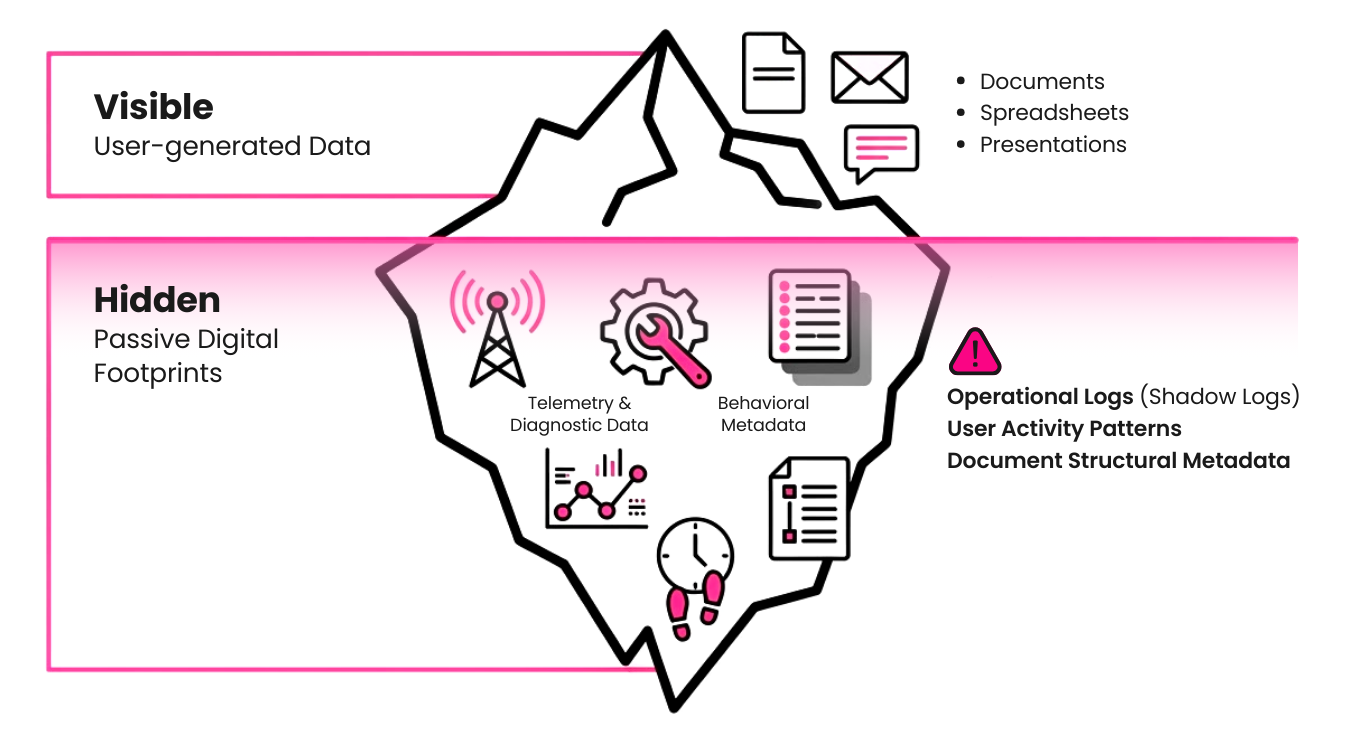
Advanced Telemetry and Diagnostic Data
Vendors collect this data under the guise of service availability and performance optimization.
- Behavioral metadata: Time spent on specific pages or sections, frequency of edits, and interaction patterns among collaborators, giving third parties potential visibility into the distribution of key personnel and internal workflow efficiency.
- Environment identifiers: Connection IP, device unique identifier (UUID), operating system (OS) version, and current security patch status.
Beyond basic status data, it captures structural metadata and user work patterns. This extends to email subjects or sentences processed through office tools like translators and spell checkers. The issue is that this may contain sensitive information that CIOs must not ignore. This creates a data exfiltration risk, potentially exposing confidential project names and internal structures to outside parties.
Server-side Operational Logs and Shadow Logs
In a SaaS architecture, all operations are processed on the vendor server. CSPs generate server logs and temporary snapshots beyond the company’s visibility, ostensibly for system optimization and disaster recovery.
- System logs: API call records, data synchronization history, and authentication logs.
- Temporary backups and snapshots: Internal copies created to support real-time co-authoring and version control.
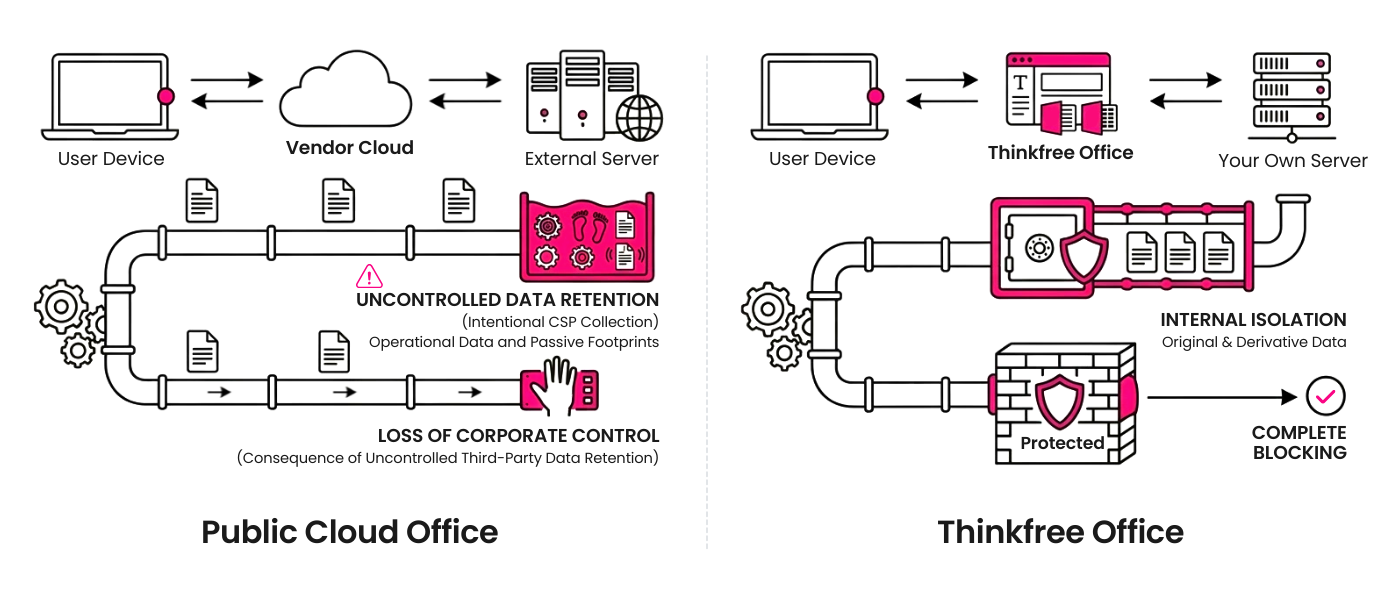
Even after deletion, traces may linger deep within vendor infrastructure as shadow logs, governed by the CSP’s backup policies. The company retains no authority over the permanent destruction of this data.
Document Structural Metadata
Most recently, this has become the most contentious area as competition in large language models (LLMs) intensifies.
- Data summaries: Document titles, tags, table of contents structures, and summarized keyword information.
Once fed into a vendor’s AI engine under the banner of anonymization, companies have no way to track how their unstructured data is being reprocessed.
The Achilles Heel of Global Compliance: US CLOUD Act and Data Residency
As regulations tighten, CIOs face a growing gap between data residency requirements and SaaS compliance.
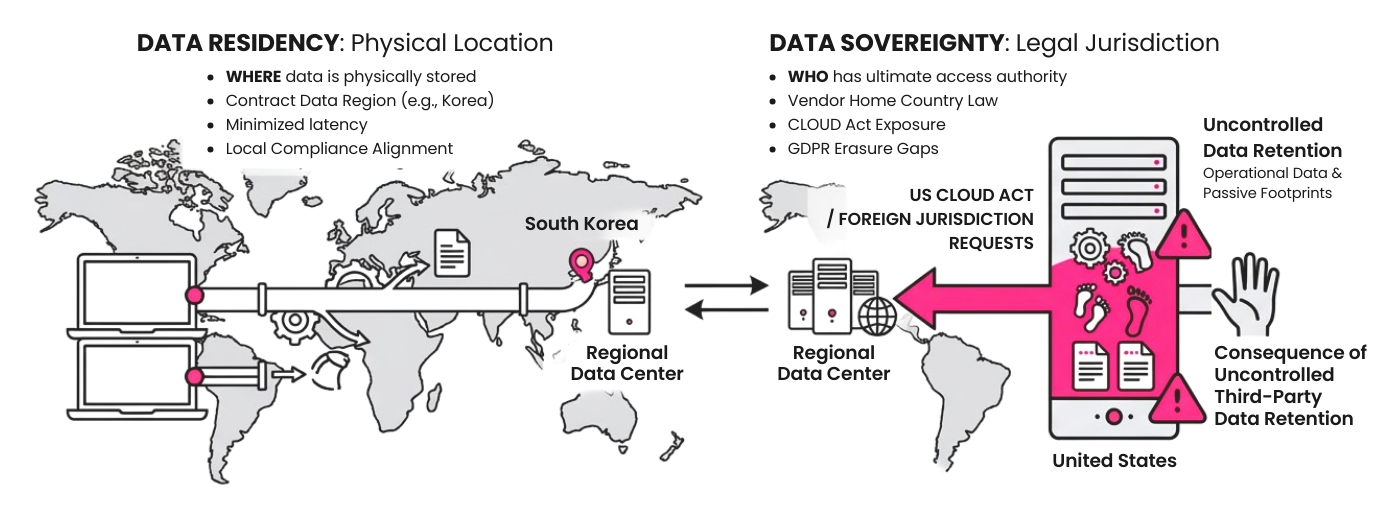
Jurisdictional Risk Under the US CLOUD Act
When using a US-headquartered CSP, companies face a legal risk that data may be disclosed upon request by the US government, regardless of where it is physically stored.
Gaps in Governance
Permanent deletion is simply not possible. Administrators cannot control operational logs left on third-party servers, nor ensure their irreversible destruction. This creates a technical defect when companies must comply with the GDPR right to be forgotten or other strengthened privacy laws.
Data Residency vs Data Sovereignty
Data residency refers to the location of the data, while data sovereignty refers to the legal jurisdiction applied to that data. In a public SaaS environment, operational logs transmitted to a vendor’s home country create a gray area of data leakage. This is a major obstacle to achieving true data sovereignty.
Vendor Lock-In: Security Rigidity from Infrastructure Dependence
Compounding this risk, vendor lock-in in cloud computing is more than a matter of cost. As a company becomes deeply integrated with a specific vendor, it loses the ability to establish independent security policies. When a vendor changes its terms or restructures its service, a company with terabytes of data locked in finds it nearly impossible to push back. Ultimately, the security architecture of the company becomes dependent on vendor policy.
When Data Sovereignty Crumbled: Real-World Cases
Indeed, the risks mentioned above are no longer theoretical. Legal and technical conflicts arising from surrendering data control to public cloud vendors are being reported worldwide.
Jurisdiction beyond Server Location
In 2013, the US government requested user information stored in a Microsoft data center in Ireland. MS refused based on local laws, but this case became a decisive factor in the enactment of the US CLOUD Act. This demonstrated that even when a data center resides within a country’s own borders, US legal jurisdiction still applies to the data if the vendor is a US-based company.
How Telemetry Data Got Microsoft 365 Banned from German Schools
Beyond jurisdictional reach, educational authorities in the German state of Hesse have prohibited the use of Microsoft 365 in schools. The primary reason was the non-transparent collection of telemetry data. Authorities concluded that automatic metadata transmission to US servers for software performance checks violated General Data Protection Regulation (GDPR).
The Trap of Anonymization and AI Training Data Controversies
Global cloud companies are recently revising their Terms of Service (ToS) to use unstructured customer data for AI model training under the pretext of service improvement. In a SaaS environment, a single line change in a vendor’s terms can allow corporate knowledge assets to be absorbed into another company’s AI engine.
Building a Sovereign Workspace with Thinkfree Office
This is precisely the paradox Thinkfree Office is designed to resolve. It offers a self-contained architecture deployed on infrastructure directly owned by the enterprise.
On-premise Document Collaboration
- Aiming for a Self-Contained Architecture, Thinkfree Office is deployed within a company’s own data center or private cloud.
- All system logs and session data are recorded exclusively on internal servers designated by the company. The architecture itself blocks any pathway for transmitting derivative data to external vendors.
Network-level Control Flexibility
- Thinkfree Office provides the convenience of a web-based solution while allowing for configuration within an intranet according to corporate security policies.
- This enables administrators to minimize external network touchpoints and fully monitor and control all collaboration traffic within the internal network.
Immediate Compliance and Zero-knowledge Infrastructure
- Unlike environments built on third-party infrastructure, Thinkfree Office provides immediate access to all server logs whenever an audit is required.
- This ensures data sovereignty, enabling enterprises to proactively respond to strict Data Residency Requirements such as GDPR or financial sector on-site inspections.
High-end Productivity and Powerful Compatibility
- There is no need to sacrifice user experience for security. TFO ensures business continuity for employees by providing a sophisticated UI and features equivalent to global standard offices.
- Thinkfree Office delivers an integrated suite of word processing, spreadsheet, and presentation tools. Document creation, editing, and sharing perform at a level comparable to installed software. As a web-based solution, it supports all browsers regardless of device or OS.
- Thinkfree Office maintains high compatibility with MS Office formats (Word, Excel, PowerPoint), letting users open and edit existing documents without layout disruptions or loss of formatting.
Thinkfree Office is currently proving its value through actual operations by global tech leaders and public institutions where data integrity and security are vital. A global 3D and PLM solutions company with over 25 million users adopted the Thinkfree Office engine to strengthen document governance across its platform. Within a massive ecosystem dealing with core design data and R&D assets for the aerospace and automotive industries, Thinkfree has proven both its high compatibility with Microsoft Office and its data isolation capabilities.
Furthermore, a prominent regional administrative agency in an advanced Asian country is securing its digital autonomy through Thinkfree Office. Rather than exposing citizen data to the public cloud, they have built a work environment fully independent of foreign jurisdictional risks.
Protect Your Data Sovereignty and Leave No Trace on External Servers
True data governance is only achieved when a company can control not just the visible files, but every passive digital footprint generated throughout the document lifecycle.
Do not leave your core assets in a vendor’s infrastructure in the name of SaaS convenience. Thinkfree Office restores data sovereignty to your organization through a secure collaboration environment that leaves no trace on vendor servers.
Are you reviewing an architecture that can truly guarantee data sovereignty?
Like this post? Share with others!