
Thinkfree Office is now offered as Thinkfree Document Editor SDK for embedded document editing, object-level APIs, and AI agent integration.
Are you planning to integrate a Web Office solution that supports MS Office formats into your service? Although it may look simple with a single iframe, you could spend several weeks developing the logic to prevent data loss. The situation becomes even more complicated when you include other factors such as UI responsiveness. Once development starts, a seemingly simple request to add document editing can quickly turn into a much more complex implementation.
This article explains how to embed a web office editor into your service using WOPI integration and web office SDK. Furthermore, we will show how these two components work together to reduce hidden engineering costs and simplify document editing and Web Office integration at scale.
Web Office solutions operate through an iframe by design. This applies to Thinkfree Office as well as other Web Office solutions. In essence, the problem is not the iframe itself, but rather the complexity that arises when you try to link business logic directly on top of it.
From a frontend perspective, the Same-Origin Policy (SOP) prevents a parent window from directly accessing an iframe loaded from a different domain. When you rely on PostMessage for cross-window communication, simple validation code is rarely enough. PostMessage separates the sender and receiver. To command the editor to fetch text and receive the result, you must design a Promise structure that assigns unique IDs to each request.
Furthermore, there is no guarantee of delivery. If you send a command but cannot verify its execution, users experience a silent failure where clicking a button does nothing. To prevent this, acknowledgment (ACK) logic and retry processing are essential. You must also account for intermittent bugs caused by slightly different iframe loading times across browsers. As a result, developers end up building a miniature communication engine from scratch.
Similarly, the backend faces complex challenges. Implementing the flow of document files between the web editor and your storage according to standards is not simple. The Web Application Open Platform Interface (WOPI) protocol is a global standard with extensive specifications. Implementing the minimum endpoints to load document info, convert files for editing, and save them back to storage requires significant engineering resources.
If you include conditions such as simultaneous editing or file locking, the number of required endpoints can rise to six or eight. This process of reinventing the wheel drains time that should be spent on core service logic.
While frontend communication and backend protocol implementation seem separate, they share a common cause. This is the gap between attaching an office editor to your service and integrating it as a native component.
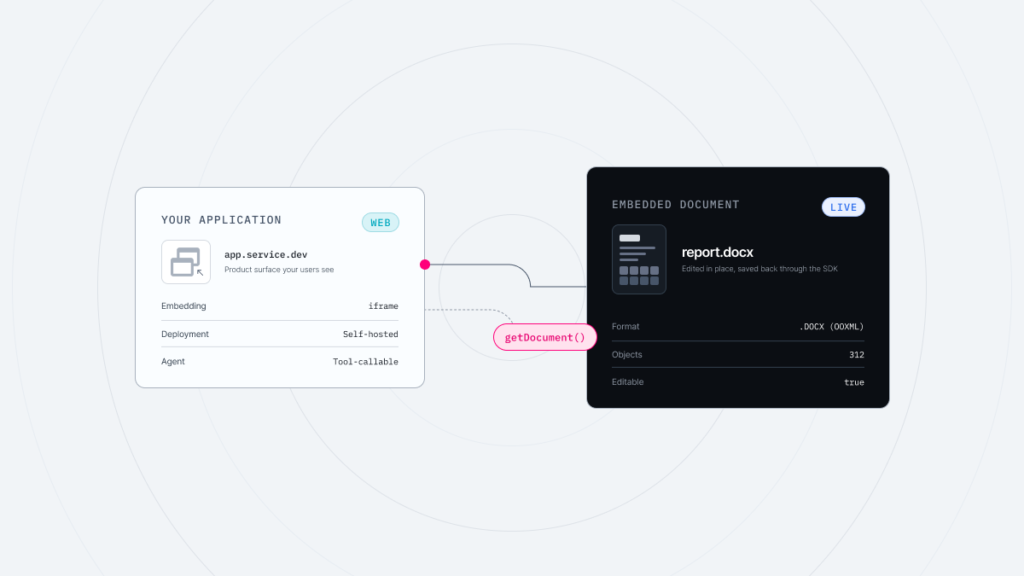
In this architecture, WOPI integration handles the backend flow between your storage and the editor, while the web office SDK manages the frontend communication and UI control. This separation lets you implement document editing integration without reinventing either layer.
An iframe acts like a window that simply calls the Web Office editor. For the editor to function properly, logic must be in place to selectively retrieve data from beyond that window. Additionally, you must decide which specific features to allow based on your business requirements. For example, you might hide the print feature for free-plan users while enabling it for pro-plan users to highlight service value.
Thinkfree Office provides a JavaScript SDK built on Secure PostMessage. Therefore, this allows developers to implement enterprise-level permission policies with minimal code. The Thinkfree SDK manages each function within the editor using unique Action IDs. This means you can go beyond hiding menus and precisely control features to increase the sense of unity within your service.
					// Manual Implementation

const requestId = `auth_req_${Date.now()}`;

if (user.role === 'GUEST') {
  iframe.contentWindow.postMessage(
    {
      action: 'HIDE_UI_ELEMENTS',
      targets: ['PRINT_BTN', 'DOWNLOAD_BTN'],
      requestId
    },
    'https://your-office-domain.com'
  );

  /*
    Typical follow-up work:
    - Map responses to requestId
    - Add timeout handling
    - Retry when messages are lost
    - Wait for the iframe to finish loading before sending commands
    */
}
					// Using Thinkfree SDK

if (user.role === 'GUEST') {
   await editor.executeCommand('DisableActions', {
       actions: ['FilePrint', 'DownloadPDF', 'FileSaveAs']
   });

   console.log('Security policy applied for guest users.');
}
(The examples are for illustrative purposes and actual API specifications may vary by environment.)
Connecting internal editor data to your service logic is even more difficult. Suppose you want to implement an AI summary feature by extracting the document text. This task, previously blocked by the isolation of the iframe, becomes simple through the Thinkfree SDK asynchronous API. The SDK functions like a built-in bridge across the strict isolation boundary of the iframe. Developers can retrieve text or update properties without building a separate communication layer.
					// Manual Promise management and ID generation

const requestId = Math.random().toString(36).slice(2, 11);

const messagePromise = new Promise((resolve, reject) => {
  const timeout = setTimeout(() => {
    window.removeEventListener('message', handler);
    reject(new Error('Request timed out'));
  }, 5000);

  const handler = (event) => {
    if (event.origin !== 'https://your-office-domain.com') return;
    if (event.data?.id !== requestId) return;

    clearTimeout(timeout);
    window.removeEventListener('message', handler);
    resolve(event.data.body);
  };

  window.addEventListener('message', handler);
});

iframe.contentWindow.postMessage(
  { type: 'GET_TEXT', id: requestId },
  'https://your-office-domain.com'
);

const text = await messagePromise;
					// Using Thinkfree SDK

const documentText = await editor.getText();
const summary = await myAiService.summarize(documentText);

console.log('AI summary completed:', summary);
(The examples are for illustrative purposes and actual API specifications may vary by environment.)
Thinkfree Office uses a multi-layered system where the client and server share responsibilities to prevent data loss.
Thinkfree prevents data loss through periodic auto-saves and maintains service stability even during unexpected shutdowns or network disconnections. Manually implementing these features usually takes over six weeks of engineering. This includes building message queues for recovery and handling browser-specific exit events. Thinkfree has already solved these issues through the standardized WOPI protocol.
A multi-device environment is now essential, but the technical details have become more complex. Thinkfree analyzed issues encountered by customers when implementing mobile editing UIs and resolved them at the SDK level.
For instance, if the web editor inside an iframe remains in edit mode when a mobile app opens a bottom sheet, the software keyboard might block the app menu. Controlling the focus inside an iframe from the parent window is notoriously difficult.
To solve this, the Thinkfree Office SDK provides a custom event called DOCUMENT_BLUR. When a bottom sheet or modal becomes active, this event allows the editor to release internal focus and hide the keyboard. Developers can achieve a smooth UX without researching individual control logic for every mobile environment.
Thinkfree Office delivers stable performance and predictable behavior even in large-scale, complex environments.
Company A, a global 3D design and PLM software provider with over 250,000 users, needed to integrate office editing features into its engineering tools. A critical requirement was ensuring data stability across thousands of simultaneous editing sessions. By applying Thinkfree backend APIs and SDKs, the company met its stability goals and significantly reduced data loss issues. The senior R&D manager cited rapid technical support and accurate feedback as decisive factors in choosing Thinkfree Office.
If you are curious about the background and results of this company’s adoption of Thinkfree, please refer to this article.
Compare how hidden costs can change during the integration process. These estimates are based on typical Thinkfree partner experiences and may vary by team size or business complexity.
Category | Manual Implementation | Thinkfree Managed Integration | Business Value |
|---|---|---|---|
Backend Integration | Manual WOPI analysis and endpoint creation (8+ weeks) | Uni-Adapter dedicated stack (1-2 weeks) | Saves 6+ weeks of initial development |
Locking & Co-editing | Additional implementation required | Included in Uni-Adapter | Saves development resources |
Data Stability | Requires custom logic | Autosave + AutoPut engine | Lower risk and fewer support tickets |
Editor Control | Limited by iframe restrictions | Standard API control via JS SDK | Immediate UI control by user role |
(These timelines are typical estimates based on Thinkfree partner cases and may vary depending on the development environment, business complexity, and team size.)
When introducing Web Office features, engineers are often troubled by more than just implementation difficulty. It can take days to determine if a broken table or a failing Excel formula is an integration issue or an engine problem. These issues can occur if file structures or metadata are slightly damaged while moving data between storage and the editor without a standardized protocol. Managed integration through the Thinkfree stack frees your service from these potential risks.
Thinkfree Office inherits the legacy of the world’s first web office launched in 2001. By leveraging decades of document engine expertise, it delivers robust support for modern global standards, including OOXML and ODF. Using the Uni-Adapter stack ensures files are transferred according to global WOPI standards to preserve structural integrity. Integration with Thinkfree links a proven office engine through a secure and reliable pathway, minimizing extra development effort.
The success of Web Office integration depends on how quickly you adopt it and how naturally it fits into your service. Do not waste resources on manual implementation. Thinkfree provides the stack that has already solved the engineering challenges developers will face.
Ready to build a seamless document editing experience for your users?
Like this post? Share with others!