Thinkfree Office is now offered as Thinkfree Document Editor SDK for embedded document editing, object-level APIs, and AI agent integration.
Integrating document editing into your SaaS or enterprise solution is not simply a matter of adding one more feature. It is an architectural decision that determines how data flows, who owns operational responsibility, and which enterprise client requirements your product can support.
In practice, many development teams and solution architects face similar questions at this stage.
For that reason, the most important criterion in choosing a deployment model is not the feature itself, but your own operational and delivery conditions. If speed is the priority, a hosted API is the natural starting point. If data sovereignty matters, private cloud is the right fit. If air-gapped delivery is a requirement, on-premise is where you begin.
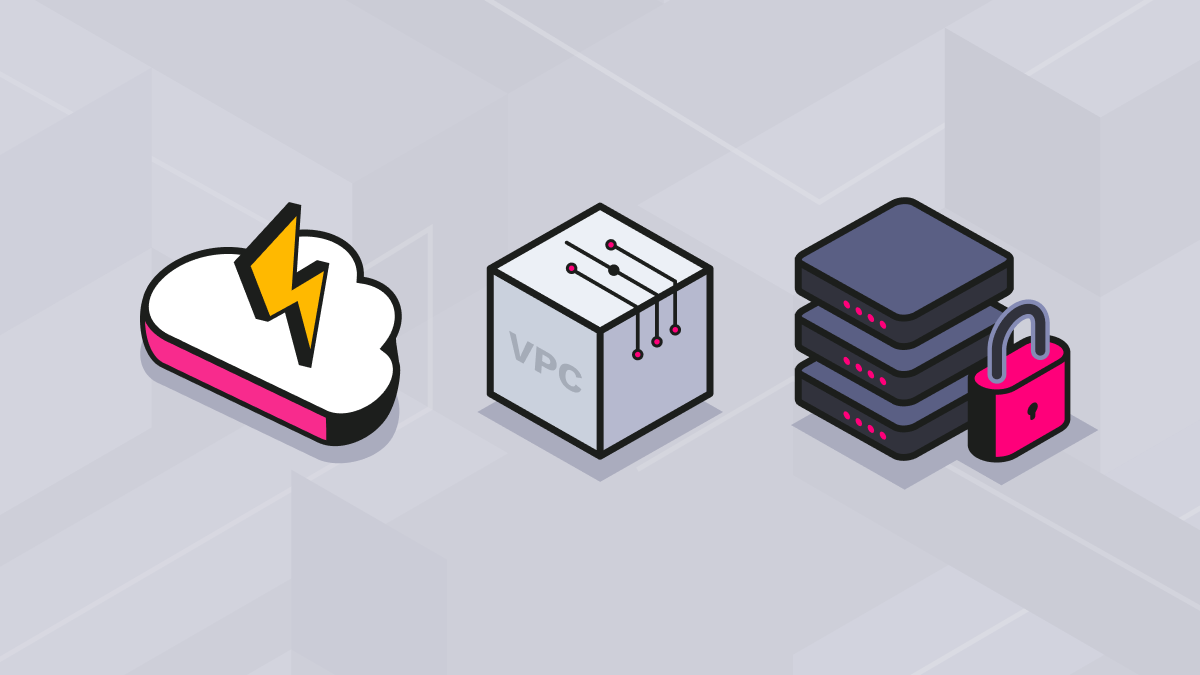
In this article, we will look at Thinkfree Office SDK as the reference point and examine how implementation and operations differ across three models in practice: (1) fast integration via Hosted API, (2) Private Cloud VPC deployment, and (3) Air-Gapped/On-Premise environments.
If you have not yet decided on a deployment model, please first refer to this article. This post focuses on the next step, namely implementation and operations after the model has already been chosen.
Before comparing deployment models, let us first look at how Thinkfree Office SDK is structured. Thinkfree Office SDK connects your solution and Thinkfree Office’s document editing capabilities as separate components. What differs across deployment models is ultimately where each component lives.
The Editor Client is the editor layer embedded into your UI through either an iframe or a Web Component. It lets you selectively control which functions appear, such as toolbars and detailed menus, and supports UI-level white labeling and customization, including brand assets. Users experience document editing as a natural part of the service.
The Document Engine is the core server component handling document import, editing, rendering and saving for formats such as .docx, .xlsx and .pptx. Where this component resides is the key difference between deployment models. In a hosted API model, it runs on Thinkfree’s infrastructure. In a self-hosted model, it runs on your infrastructure.
The SDK and API Layer serves as the communication interface between your backend and the Document Engine, handling session token issuance and document binding. Because this interface remains the same across deployment models, infrastructure changes can be made with minimal code changes. Whether your backend uses Node.js, Python or Java and your frontend uses React, Vue or Svelte, integration follows the same pattern. And so, there is no need to change your tech stack to match the environment.
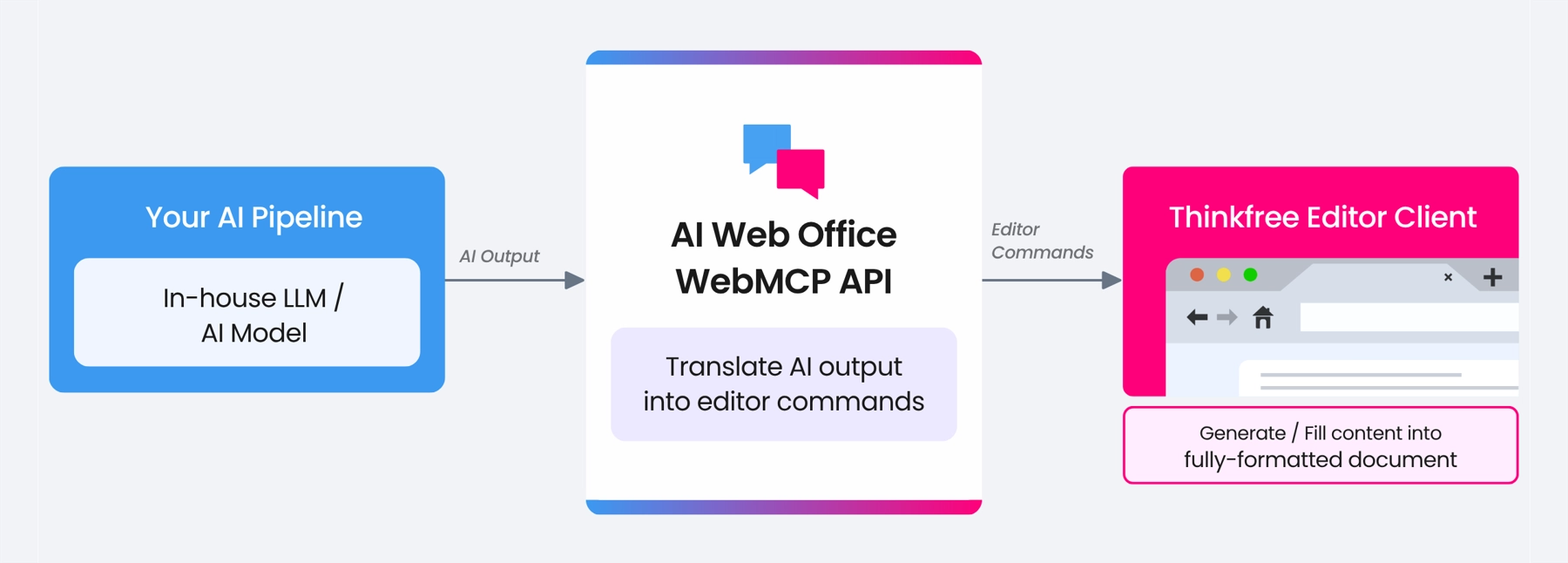
In addition, there is the AI Web Office WebMCP API. This is the connection point that converts outputs from an in-house LLM or AI model into editor commands. Going beyond simple text generation, it can integrate with your AI pipeline so that the editor can perform real document actions, such as generating charts from internal data or filling content into formatted documents automatically.
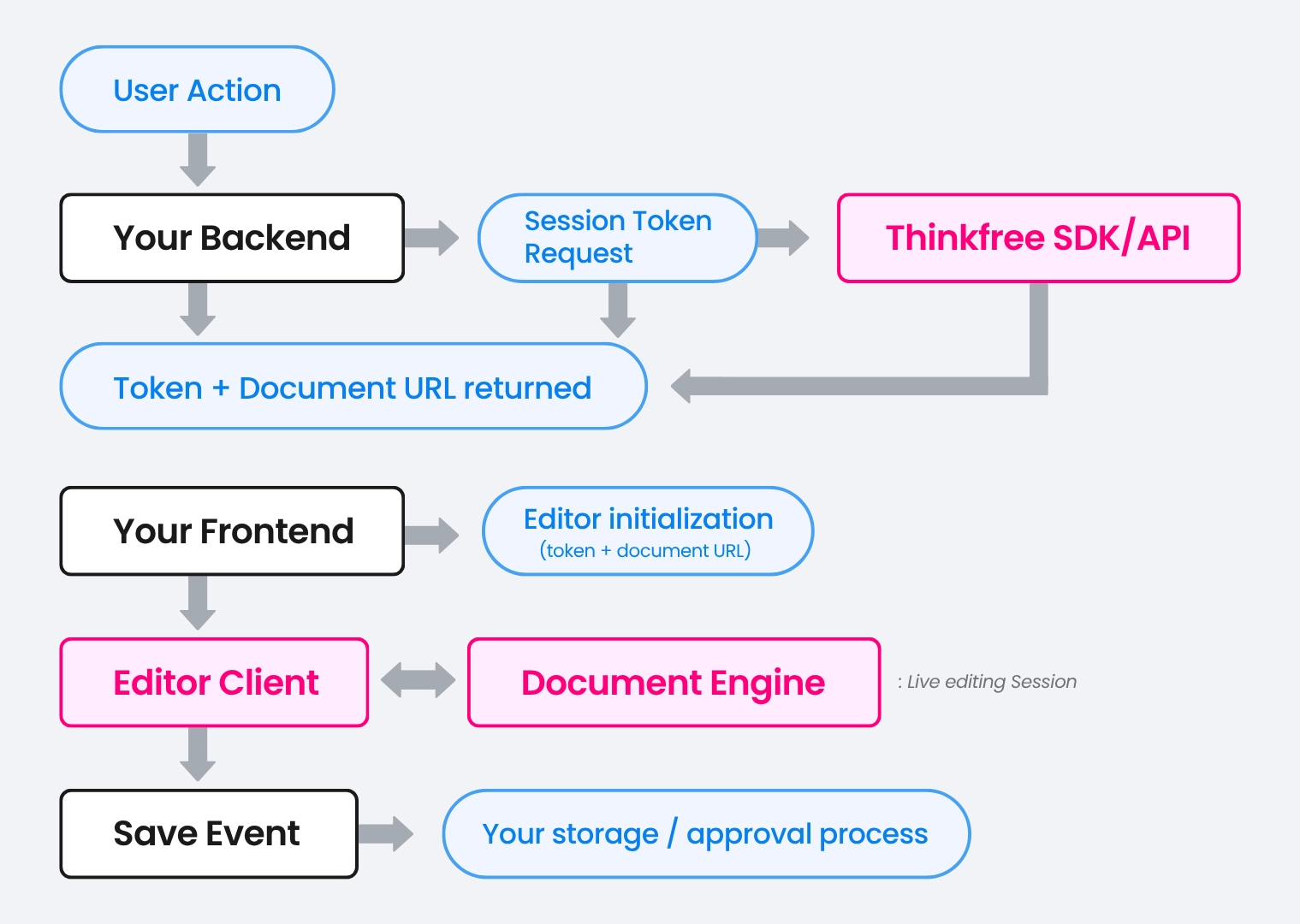
When a user request comes in, your backend issues a session token, and the frontend uses it to initialize the editor. The user then edits within your product, and save events are connected to your storage or approval process.
The main strength of this structure is that you can directly design how document data flows and where it is stored. You can embed an office editor into your service while retaining control over the data.
The most effective way to validate a new feature is to build something that actually works. A hosted API is the fastest way to that outcome. There is no server to configure or infrastructure to design. You can connect document editing capabilities to your service simply by issuing an API key. It is a fast and lightweight integration model that is also well suited for MVP validation and PoC stages.
The advantage of Thinkfree Office’s hosted API model is not limited to the speed of initial adoption. Your existing code assets stay intact even if infrastructure requirements tighten later on. Thinkfree Office SDK is designed so that migrating from Hosted API to Self-Hosted requires minimal code changes, making it a practical choice even when future expansion is anticipated.
Your backend calls the Thinkfree API to obtain a session token and document URL, which the frontend then uses to initialize the editor. Thinkfree Editor is embedded into your solution’s UI via iframe or Web Component, and an event interface connects editor actions such as save completion or errors to your business logic. This flow allows document access permissions and editing experience to be managed consistently within your own service.
As your client base grows or delivery requirements become more demanding, expectations around data paths and operational responsibility also change. There are two common triggers for migration.
The first is to meet data residency requirements. When delivering a solution to enterprise clients or regulated industries, it may be difficult to satisfy contractual conditions simply because data passes through external servers.
The second is the need for enhanced performance stability. If traffic increases sharply and performance variability in a multi-tenant environment begins to affect service quality, it may be worth considering a self-hosted model where the Document Engine runs on dedicated infrastructure.
In other words, if you have reached such a transition point, or if you need to prepare for the possibility of one later, you should revisit the timing and direction of your infrastructure transition.
Private cloud is a model in which the Document Engine runs inside your VPC. It is a representative option for teams that are entering a stage where independent data residency is required or where enterprise client support is becoming a central concern.
This approach is particularly suited for cases when you want to reduce dependencies on external infrastructure while preserving a SaaS-style user experience. Because the Document Engine runs within your VPC, data does not leave your environment. It also makes it easier to align with your clients’ security policies, data separation requirements, and internal infrastructure standards while reducing your team’s exposure to external service dependencies.
Thinkfree Office’s Document Engine is not tied to a specific cloud service provider. You can deploy it the same way across AWS, Azure, and GCP. If you are operating a self-hosted collaboration platform as your storage layer, such as Nextcloud, you can build a complete document editing environment without external cloud dependence simply by deploying the Thinkfree Document Engine in the same infrastructure.
Thinkfree Office is also packaged as a Docker container, making deployment and integration uncomplicated. You can deploy it together with practical operational elements such as license keys, storage backend settings, and data volume mounts. Reference deployment examples with the required parameters are available in the technical documentation.
Migrating from Hosted API to Self-Hosted involves minimal SDK code changes. Since the API interfaces are designed to be the same in both cases, the integration target can be changed simply by entering the domain and adapter name in the office settings of the admin portal. In practice, migration can be done by replacing the endpoint URL and adjusting internal authentication, while the calling code can remain unchanged.
Deploying the Document Engine in a VPC does not mean the service is ready immediately. As operational responsibility increases after deployment, you also need to design network configuration and incident response processes together. Consider reviewing these three key areas early on.
On-premise or air-gapped deployment is chosen when the highest level of independence is required. This is the typical option in regulated industries such as finance, public sector, defense, and healthcare, where data leakage concerns are especially sensitive, or in isolated environments where external communication must be blocked.
The key principle of this model is eliminating external dependencies. It must be designed around an environment in which image deployment, license handling, and operational workflows are all controlled, and in the case of air-gapped environments, offline by nature.
Thinkfree Office Document Engine image supports offline deployment. The image is pulled in an internet-connected environment using docker save, transferred to the isolated network, and loaded via docker load. License validation also works without communicating with an external server. It verifies validity by comparing injected license information with the server’s unique identifier, such as the Machine ID, making it suitable for offline environments.
If production-grade stability and scalability are required beyond single-container operation, a Kubernetes-based deployment is recommended. Thinkfree Office provides a Helm Chart package. After registering the image in your private registry, you can configure the replica count, image path, storage class, and resource requests and limits in values.yaml. Detailed installation steps are available in the technical documentation.
To support automatic scaling in response to traffic changes, you can configure Horizontal Pod Autoscaler(HPA) to maintain stability even when concurrent editing sessions surge.
Production stability is largely shaped during the design stage rather than after deployment. In closed-network delivery contracts, enterprise clients often require high-availability(HA) configuration, so the following three items should be reviewed before deployment.
Deployment is only the beginning. Once the service is live, the more important issue is how stably the operations framework can be maintained. In a self-hosted environment, your team takes direct ownership of the monitoring, updates, and incident response that Thinkfree manages under the hosted API model. Consequently, this can have a direct impact on the product experience.
The first aspect to consider is observability. Tracking key metrics such as concurrent editing sessions, document conversion processing time, and error rate helps detect service anomalies early. Tools such as Grafana and Prometheus can improve operational visibility.
Update and version management policy is also important. In a self-hosted environment, your team decides when and how updates are applied. In a Kubernetes environment, the RollingUpdate strategy lets you transition versions with no downtime”
The initial response to common incident types during operations is as follows.
Criteria | Hosted API | Private Cloud | On-Premise / Air-gapped |
|---|---|---|---|
Time to deploy | Fast | Medium | Slowest |
Infrastructure overhead | Low | Medium | High |
Data residency | Restricted | High | Complete |
Air-gapped support | Not supported | Conditional | Supported |
If you need help deciding which model to start with, or which deployment method best fits your current enterprise clients’ requirements, a consultation with Thinkfree can help you define a concrete direction.
Integrating Thinkfree Office SDK into your service eliminates the friction that forces end-users to download files and open them in a separate office application. Whether you start quickly with a hosted API or implement in a strict closed-network environment, you can build that experience on the same codebase.
Managing the entire document lifecycle within a single workflow, while maintaining full MS Office and ODF compatibility, turns that seamless continuity into your product’s true competitive edge.
Thinkfree Document Editor SDK enables developers to embed document creation, editing, viewing, and collaboration capabilities directly into web applications. Instead of building an office suite from scratch, organizations can integrate these capabilities into their existing products and workflows.
Yes. Thinkfree Document Editor SDK is designed to integrate with existing web applications, SaaS platforms, and enterprise systems. Organizations can embed document creation, editing, and AI-assisted document workflows without rebuilding their existing environment.
No. Thinkfree Document Editor SDK extends existing applications rather than replacing them. Organizations can add enterprise-grade document capabilities while preserving their current architecture, business logic, and user experience.
Yes. Thinkfree Document Editor SDK supports on-premises and hosted deployment models, allowing organizations to align document services with their security, compliance, and infrastructure requirements.
Like this post? Share with others!