
In many industries, especially in healthcare, legal, manufacturing, and pharmaceutical environments, teams spend significant time on repetitive document work. They manually search through multiple drafts to find the latest version of internal standards, repeatedly copy review results into separate documents, or sort through piles of logs by hand when an audit is approaching.
To reduce both the burden of repetitive document work and the risk of human error, many organizations are considering AI and document automation. This is already a familiar challenge for solution providers serving those industries, including vertical SaaS teams, ISVs, and platform engineering organizations.
But when solution providers try to eliminate document bottlenecks through their products, the approach does not always align with what customers actually need. Integrating external automation tools or building document capabilities in-house often diverts engineering resources into long-term maintenance. A Deloitte survey showing that average IT organizations spend 55% of their technology budget on maintaining existing operations and only 19% on building innovative features highlights this structural dilemma clearly.
So what should document automation actually include in today’s industrial environments?
Document automation includes many different technologies, and many of them are already commercially available. The problem is that each approach tends to cover a narrower scope than people expect.
This involves digitizing unstructured documents using OCR or Document AI to extract text and data. Post-extraction editing, format preservation, and review and approval workflows still require a separate layer.
RPA (Robotic Process Automation) is a representative example. It reduces repetitive UI operations and data transfers by triggering documents or moving them to other systems. These tools can move documents, but they cannot improve content quality or maintain formatting consistency. Automation of movement connects the steps before and after a workflow, but it does not replace the document layer itself.
E-signature tools handle legal finalization at the final stage of the document lifecycle. They do not participate in the earlier stages of writing, editing, content review, or format preservation. If the create, edit, and review flow is not handled inside the product, the user experience becomes fragmented before the document even reaches signature.
This approach fills predefined templates with data to generate documents at scale, such as notices or contract copies. This approach works well when documents move in one direction only, but it falls short when human intervention is needed at each stage, such as review, revision, clause negotiation, or approval. In other words, it has clear limits in industrial environments where documents must be treated as objects of collaboration and review, not just output files.
Automation type | Unaddressed Areas |
|---|---|
Document scanning and data extraction | Document creation, editing, and workflows |
Automating document transfer between systems | Content quality and format consistency |
Digital signature and legal finalization | Pre-signature creation and review stages |
Bulk generation | Documents requiring editing, collaboration, and review |
Each technology addresses a different stage of the document workflow, but none provides an end-to-end document experience inside the product. Therefore, Solution providers need document automation that supports the entire document workflow. It keeps document creation, editing, review, approval, and formatting inside a single product to keep customers bound to one platform.
Although detailed regulations and format requirements vary by industry, the underlying document problems are surprisingly similar across sectors. Repetitive work, content errors, inconsistency, and audit-trail pressure all show up again and again. But when teams try to solve these issues by building document features in-house, a large amount of development effort goes into non-core capabilities such as OOXML and ODF compatibility, version and history management, audit trails, and access control.
Solution providers can integrate Microsoft 365 Enterprise or the Google Docs API, but those options often fail to deliver when the goal is to complete the document experience inside the product. Data transfer risk and customization limits become especially visible in regulated industries such as healthcare, legal, and financial services. As a result, delivering a vertical-specific document automation experience requires a third option that is neither in-house development nor Google or Microsoft product integration.

Legal teams operating Legal SaaS or contract management platforms will repeatedly encounter the following problems from their customers.
General-purpose cloud editors make collaboration convenient, but they are not designed for legal workflows where document fidelity, clause-level review, and confidentiality are essential. If teams build these capabilities themselves, they must implement Track Changes, clause-level comments, version control, and secure document handling, all of which add significant engineering complexity.
For that reason, legal SaaS products need a flow that allows draft creation, clause editing, review and approval, and final storage to happen without users leaving the product. Document exchanges with external law firms or clients must preserve formatting, and an on-prem deployment option should help prevent confidential documents from being sent outside the company.

Teams building manufacturing SaaS or MES products often see a mismatch between product intent and what happens on the shop floor.
These issues arise because documents are often managed outside the operational systems that generate the data. As a result, updates, approvals, and revision histories become disconnected from day-to-day production workflows. Managing Word files separately or exporting to PDF makes on-site edits and instant lookup difficult, and revision history is not preserved.
By embedding document capabilities into an existing manufacturing SaaS or MES product, teams can let users edit and save inspection documents and SOPs directly inside the system. In that case, document updates, review, approval, and history preservation should all be handled internally when regulations change. In addition, LLMs can automatically populate repetitive fields such as item information, specifications, and process conditions to reduce bottlenecks further.

For teams operating pharmaceutical SaaS or clinical management systems, document accuracy and regulatory compliance are core to product competitiveness.
Pharmaceutical documentation is governed by strict regulatory requirements rather than convenience. General-purpose cloud editors are rarely designed to support validated document workflows, while building those capabilities in-house can divert engineering resources away from core product innovation.
To prepare document automation infrastructure for pharmaceutical SaaS, eCTD submission platforms, or clinical management systems, the system must automatically record revision history and approval timestamps so it can respond immediately to GMP audits or regulatory inspections. It must also support on-prem deployment so confidential documents such as clinical data and ingredient formulas do not leave the organization.
The industry-specific document problems raise one question: how quickly and reliably can you embed a document layer inside your product? If you can embed a complete document layer instead of building one yourself, you can spend less time on infrastructure and deliver new features faster.
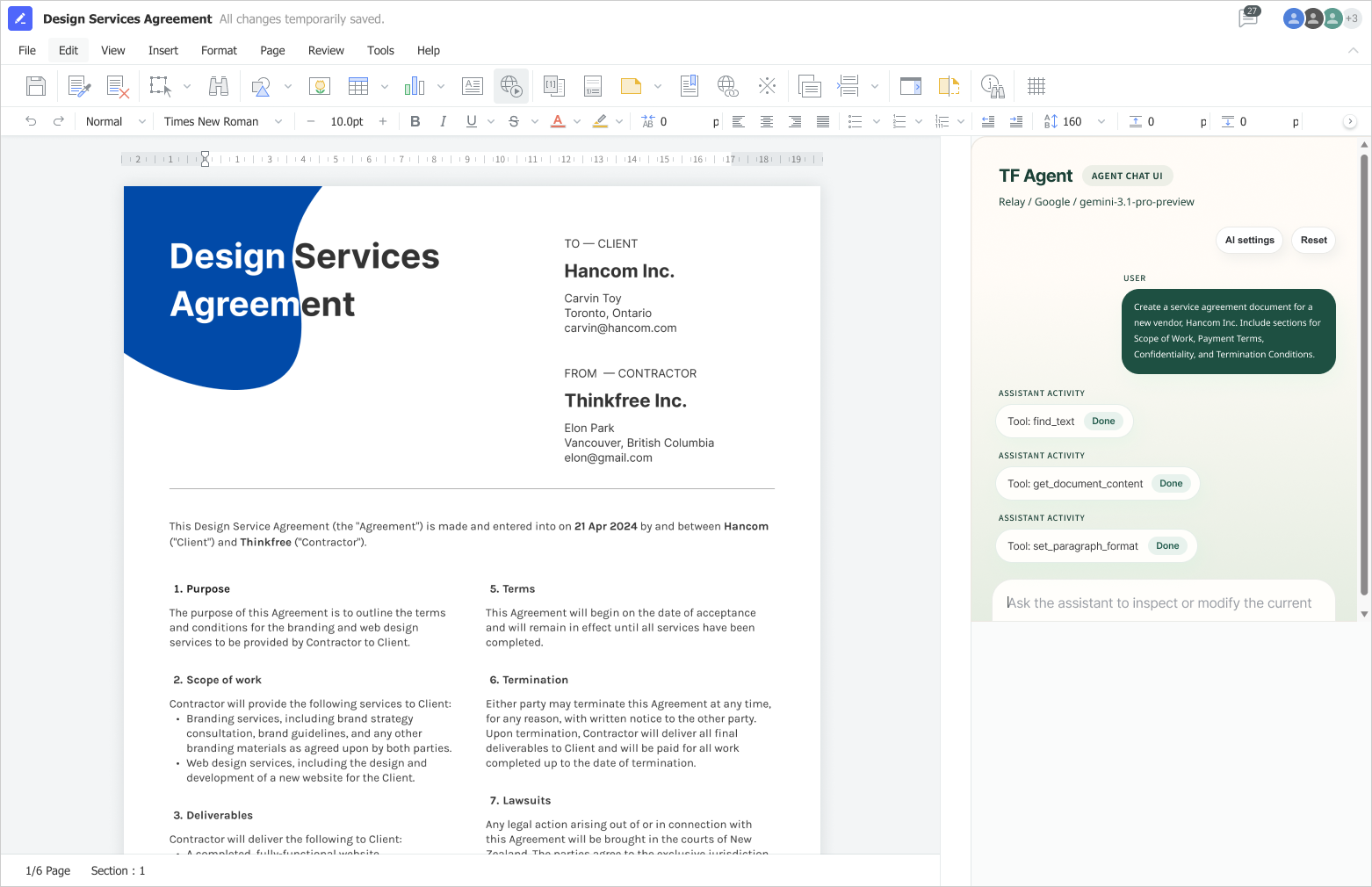
Thinkfree Document Editor SDK is an enterprise web office solution with a built-in AI Document Engine. Its SDK helps solution providers embed document editing capabilities into their own products with faster delivery and smoother integration. It is also designed to address the core document challenges found in vertical SaaS products across industries.
Document automation is no longer a nice-to-have feature. In vertical industries, it is a key user experience element that shapes both product selection and long-term retention. By completing the create, edit, review, approve, and format-preservation flow inside the product, you can bring fragmented customer experiences into one platform.
The challenge is how to deliver that experience efficiently. Building document capabilities in-house requires significant engineering investment, while relying on external editors introduces trade-offs in security, customization, and document fidelity.
Instead of choosing between these two approaches, solution providers can embed a document automation engine through an SDK. It provides a practical way to meet industry-specific requirements without slowing product development.
Would you like to design a document embedding strategy for your product? If you are evaluating an AI-based office engine, learn more below or request a demo.
See how it works in your industry.
Have a specific integration question?
A document automation SDK enables developers to embed document creation, editing, viewing, and collaboration capabilities directly into their own applications. Instead of building an office editor from scratch, development teams can integrate these features into their existing workflows.
Yes. Thinkfree Document Editor SDK integrates AI-powered document generation directly into your application, allowing users to generate content and continue editing it within the same document workflow. Its model-agnostic architecture enables developers to connect the LLM that best fits their requirements.
Thinkfree Document Editor SDK is a strong fit when document creation and editing are core capabilities of your application rather than standalone productivity tasks. It is designed for Vertical SaaS platforms that require seamless in-app document workflows, customizable user experiences, flexible deployment options, and greater control over data governance and compliance.
Industries that manage structured documents as part of their core workflows often benefit the most. These include healthcare, legal services, financial services, insurance, government, education, and other Vertical SaaS applications where document accuracy, security, and compliance are important.
Many enterprise organizations require flexible deployment options to meet security or regulatory requirements. Thinkfree Document Editor SDK can be deployed on-premises, in private clouds, or in public cloud environments to align with organizational policies.
Like this post? Share with others!