
Our documents are already digital. Why would we need automation on top of that?
Generative AI has become part of enterprise work over the past few years. Document work is no exception. Drafting and organizing text have become faster. The problem is that bottlenecks still remain in real day-to-day work. AI has accelerated how quickly content is produced, but the way documents move through an organization has changed very little.
Simply pasting AI-generated text into a document is not document workflow automation. The question enterprises must now answer is not whether AI can write, but how well it connects to the end-to-end workflow. This article explores what document workflow automation actually solves in real enterprise environments and what organizations should expect from AI in 2026.
Document workflow automation is not simply about writing faster. It is the systematic automation of the entire document flow within an organization, from draft generation through review, approval, storage, sharing, reuse, and archiving.
In practice, this means how documents move through the organization from one stage to the next. The goal is to manage all of this as a connected, automated flow rather than a series of disconnected manual steps.
The reason is simple. There is a clear gap between generating content with AI and having an automated document workflow.
AI can generate drafts quickly, but everything that follows still depends heavily on manual work. That often means reformatting to corporate standards, incorporating data, and routing the document through departmental review and approval.
In practice, the same bottlenecks keep appearing:
AI helps organizations start writing, but the time-consuming work of turning that output into a finished document remains. The central question is how naturally AI can be integrated into an existing enterprise workflow automation framework. This challenge is especially important for teams such as legal, procurement, and operations, where security and audit trails are critical.
One of the core limitations of generative AI output is that it does not always meet the requirements for immediate use in real work. These often include internal style and terminology standards, approved document formats, a consistent brand voice, data accuracy, and a standardized structure.
As a result, employees end up revising and rewriting AI output repeatedly. When multiple teams work on the same document simultaneously, version conflicts and lost revision history become common. Contracts, proposals, and reports produced at scale also tend to diverge in structure and phrasing across contributors, making organization-wide quality consistency hard to sustain.
Many organizations recognize the need for AI but run into data governance and security constraints at the deployment stage. In regulated industries such as finance, the public sector, and legal sector, cloud-based SaaS AI tools are often restricted because documents may contain sensitive data. In these environments, AI often remains disconnected from core document systems.
Organizations that feel this most strongly include:
AI is no longer just a writing aid. The benchmark for enterprise AI document tools in 2026 has shifted toward how deeply AI can be integrated into the broader workflow.
The foundational use case remains generating first drafts from raw inputs:
Enterprise documents carry more than information. They reflect policy, brand, and legal requirements. When AI follows an organization’s document standards, including tone, terminology, and formatting rules, it reduces quality variance across departments and maintains consistency at scale.
Managing frequently used clauses, layouts, and section structures as reusable templates is an important way to reduce manual work and improve consistency. Procurement teams can quickly generate quote and contract templates, while operations teams can automate recurring announcements and internal notices. The ability to map enterprise data directly into documents also reduces manual work significantly.
AI that can summarize lengthy documents, compare key changes between versions, and organize review comments reduces turnaround time. Combined with sharing, commenting, and version tracking, this helps accelerate the approval cycle and helps decision-makers focus on what matters.
Ultimately, AI delivers value not as a replacement for writing tools, but as infrastructure that improves the speed, accuracy, and consistency of the entire document workflow.
Organizations are no longer evaluating individual features on their own. From an enterprise workflow management perspective, four criteria now define how AI-based document solutions are assessed.
When any of these criteria goes unmet, the AI document tool rarely translates into meaningful operational change.
The benefits of enterprise workflow automation extend across the organization, but certain teams see the most immediate impact.
IT and digital transformation teams evaluate AI document platforms against security compliance, centralized template governance, and audit log requirements. Solutions that support on-premise or private cloud deployment can help address these constraints.
Operations teams gain efficiency with high-frequency, repeatable documents such as reports, internal announcements, and standard notices.
Legal departments reduce review cycles through AI-assisted contract drafting, risk clause identification, review summaries, and data cross-checking.
Procurement and contracts teams generate proposals, quotes, and contracts that are ready for immediate use, accelerating response times considerably.
What these teams share is a need that goes beyond text generation. They require a tool where document creation, editing, collaboration, approval, and management operate as a single connected flow. AI capability only translates into operational value when it is embedded in the workflow rather than bolted on as a standalone feature.
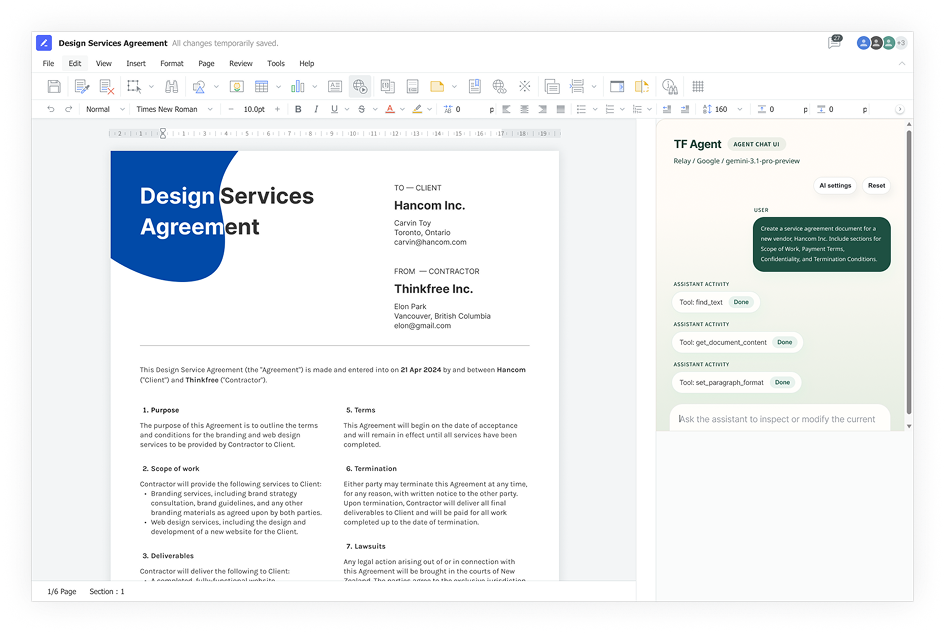


These capabilities can be used individually or in combination to fit the needs of different teams.
Thinkfree AI Web Office supports a wide range of document workflows, such as turning AI analysis output into reports, reviewing and updating contracts, and mapping structured enterprise data into fixed-format documents. These capabilities can be used individually or in combination to fit the needs of different teams.
In 2026, competitive advantage in the enterprise does not come simply from generating documents faster. What really matters in document workflow automation is whether the entire process runs faster and more accurately, from AI output to a finalized document.
Explore how Thinkfree AI Web Office helps enterprises streamline document workflows with AI.
Like this post? Share with others!