

Keep Office Document Editing On-Premises
After OOS Support Ends

Office Online Server support ends on December 31, 2026.
Evaluate a self-hosted online office for browser-based document viewing and editing without moving sensitive business documents to a public cloud.

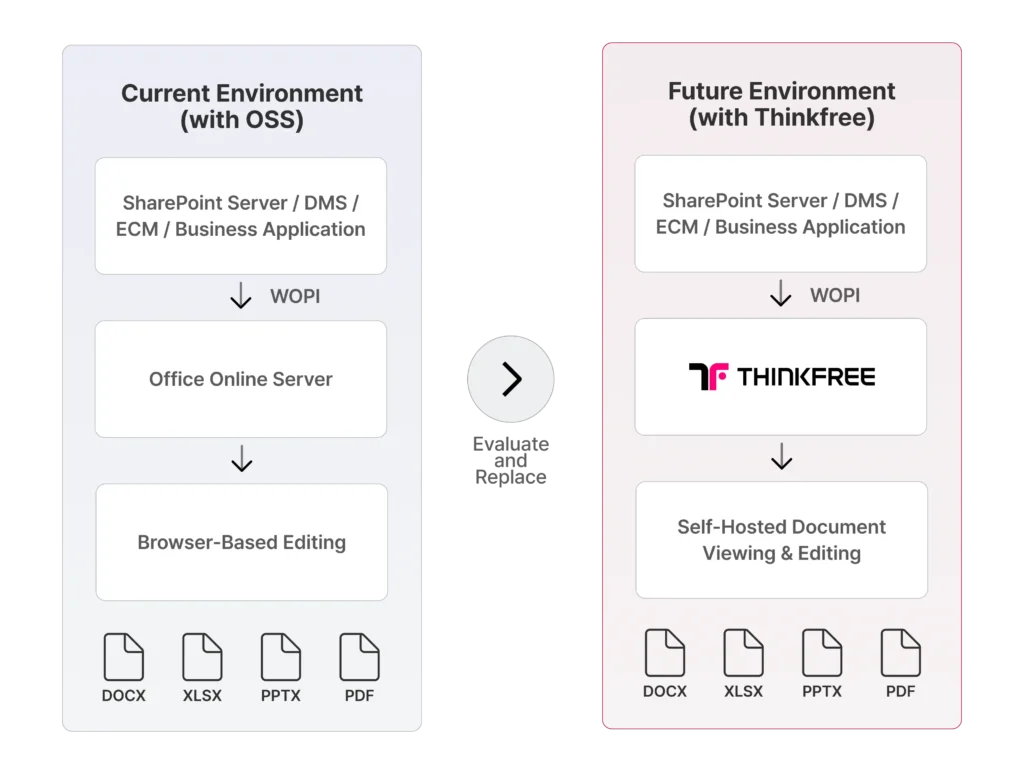
Diagram comparing an existing Office Online Server environment with a self-hosted Thinkfree Office replacement architecture for browser-based document editing.
Self-hosted deployment within the organization’s own infrastructure

Self-Hosted Deployment

Deploy within your own infrastructure.

Browser-based editing for Office documents without installing desktop software

Browser-Based Editing

View and edit Office files directly in the browser.

Integration with enterprise systems such as SharePoint, DMS, ECM, and business applications

Enterprise Integration

Connect with SharePoint, DMS, ECM, and more.

Technical proof-of-concept support for integration and document compatibility testing

Technical PoC Support

Validate compatibility before you commit.

OSS End of Support is an Infrastructure Decision, Not Just a Software Update

Office Online Server currently provides browser-based viewing and editing capabilities for Office files across SharePoint Server and other WOPI-compatible environments.

When support ends on December 31, 2026, organizations that continue operating OOS will no longer receive new security updates, non-security updates, or Microsoft assisted support.

For organizations that cannot move document workloads to Microsoft 365, the challenge is not simply replacing a server. It is maintaining document viewing, editing, permissions, integrations, and operational control across the existing enterprise environment.

Security and support risks after Office Online Server reaches end of support

Security and Support Risk

No new security updates or Microsoft-assisted support after end of support.

Cloud migration constraints for organizations that must keep documents and systems on-premises

Cloud Migration Constraints

Public cloud migration may not meet every organization's security, sovereignty, or architecture requirements.

Continuity of document editing integrations across SharePoint, DMS, ECM, and enterprise applications

Integration Continuity

Existing SharePoint, DMS, ECM, and business application workflows still need document viewing and editing.

For Organizations That Need Control Over Documents and Infrastructure

Government and public sector organizations requiring secure, self-hosted document infrastructure

Government and Public Sector

Maintain controlled document environments for public records, internal collaboration, and sensitive administrative workflows.

Financial services organizations requiring secure, self-hosted document editing and data control

Financial Services

Support browser-based document workflows while retaining control over data location, permissions, and infrastructure.

Healthcare and research organizations requiring secure, self-hosted document collaboration and data control

Healthcare and Research

Integrate document viewing and editing into private systems used for sensitive operational and research information.

Manufacturing and enterprise IT organizations requiring self-hosted document integration and infrastructure control

Manufacturing and Enterprise IT

Connect document capabilities to internal portals, DMS platforms, project systems, and distributed enterprise workflows.

Three Paths After Office Online Server

Continue Running OSS

Continue operating the existing environment after support ends.

Considerations:
• No new Microsoft security updates
• No assisted support options
• Increasing operational and compliance risk

Move to Microsoft 365

Migrate document workloads and collaboration services to Microsoft’s public cloud.

Suitable when:
• Public cloud deployment is acceptable
• Existing systems can be migrated
• Data residency and integration requirements can be met

Evaluate a Self-Hosted Alternative

Replace OOS document services while maintaining deployment within your own infrastructure.

Suitable when:
• Documents must remain on-premises
• Existing enterprise systems must be retained
• Browser-based Office editing is still required

Office Online Server
Thinkfree Office
Microsoft 365
On-premises
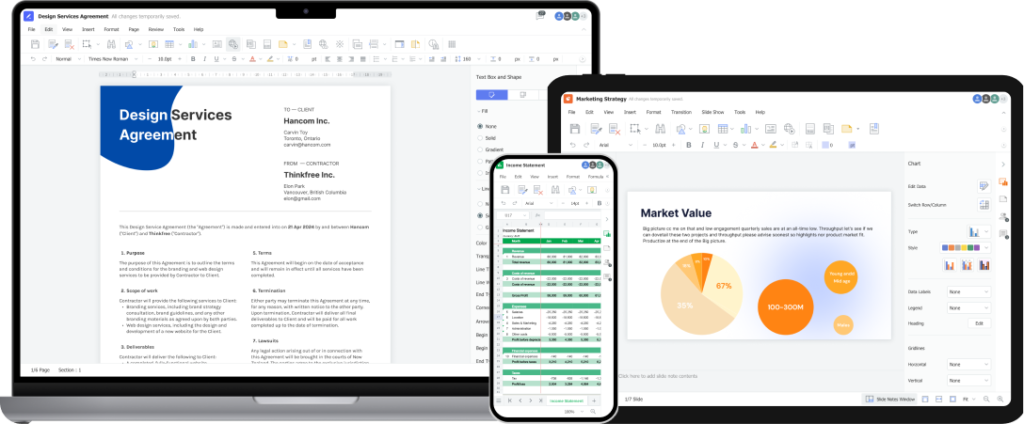
An mockup showing Thinkfree Office running seamlessly across a laptop, a tablet, and a smartphone. The laptop displays a word processor document, the tablet shows a presentation slide with charts, and the smartphone shows a spreadsheet. This visual highlights the suite's cross-platform accessibility and consistent user experience on different screen sizes.

Maintain Browser-Based Office Editing in Your Own Environment

Thinkfree Office provides browser-based document viewing and editing capabilities that can be deployed within an organization's own infrastructure.

It is designed for enterprises and solution providers that need to integrate Office document capabilities into document management systems, private cloud platforms, and business applications.

Rather than forcing every document workflow into a public cloud, Thinkfree enables organizations to evaluate a self-hosted architecture based on their security, integration, document compatibility, and operational requirements.

Support for viewing and editing DOCX, XLSX, PPTX documents in the browser

DOCX, XLSX, PPTX Support

Collaborative editing of Office documents by multiple users

Co-editing
(Real-time)

Conversion and export of Office documents to PDF format

PDF Conversion & Export

Integration with enterprise applications through API, SDK, or WOPI

API / SDK / WOPI Integration

What to Evaluate When Replacing Office Online Server

Evaluation Area
Office Online Server
Thinkfree Office
Deployment model
On-premises
Self-hosted / On-premises / Hosted-API
Supported
Supported
Supported
Supported
DOCX support
Supported
Supported
XLSX support
Supported
Supported
PPTX support
Supported
Supported
WOPI support
Co-editing
Supported
Supported
PDF conversion
Supported
Supported
Data location
Customer-controlled
Customer-controlled

Replacement Must Be Validated Against Your Actual Environment

No two OOS environments are identical. Integration methods, document complexity, authentication, permissions, custom applications, and operational requirements can vary significantly. Thinkfree evaluates replacement feasibility using your actual architecture and representative business documents.

Validation of SharePoint, DMS, ECM, WOPI, API, and SDK integration requirements

1. Integration

SharePoint, WOPI host, DMS, ECM, or custom application integration
Validation of document layout, fonts, tables, charts, formulas, and embedded objects

2. Document Fidelity

Layout, fonts, tables, charts, formulas, animations, and embedded objects

Validation of document opening, editing, saving, conversion, and collaboration workflows

3. Editing Workflows

Open, edit, save, rename, download, convert, and collaborate

Validation of server configuration, network environment, storage, and deployment requirements

4. Deployment Requirements

Validation of server configuration, network environment, storage, and deployment requirements

Validation of deployment topology, server capacity, storage, network, and scalability requirements

5. Infrastructure

Deployment topology, scaling, load balancing, storage, and network requirements

Validation of monitoring, updates, technical support, backup, recovery, and lifecycle management requirements

6. Operations

Monitoring, updates, support, backup, recovery, and lifecycle management

Frequently Asked Questions (FAQ)

Q1. When does Office Online Server support end?

Microsoft lists December 31, 2026 as the end-of-support date for Office Online Server. After support ends, Microsoft states that new security updates, non-security updates, assisted support options, and online technical content updates will no longer be provided.

An existing OOS environment may continue to operate technically, but it will no longer receive the support and updates described in Microsoft’s lifecycle policy. Organizations should assess the resulting security, compliance, support, and operational implications.

No. Microsoft 365 may be suitable for organizations that can move document workloads to the public cloud. Organizations that must retain documents and applications within their own infrastructure can also evaluate self-hosted alternatives.

Replacement feasibility depends on your current architecture, connected host systems, required OOS capabilities, document complexity, and authentication model. Thinkfree recommends a technical assessment and PoC before migration.

WOPI integration feasibility depends on the host implementation, required operations, and document workflows. Thinkfree reviews each environment through a technical assessment or PoC.

Thinkfree supports browser-based handling of major Office document formats, including DOCX, XLSX, and PPTX. Exact viewing, editing, conversion, and collaboration capabilities should be validated against representative business files.

Yes. Thinkfree Office is designed for deployment within customer-controlled infrastructure or private cloud environments.

During a PoC, representative documents are tested for layout, fonts, formulas, charts, tables, images, animations, embedded objects, editing behavior, saving, and conversion.

The timeline varies according to integration complexity, infrastructure requirements, document testing, security review, and user acceptance. A technical assessment is required to define a realistic migration plan.

In many cases, the existing host application can remain in place while the document viewing and editing layer is replaced. Feasibility depends on the current integration architecture and required workflows.

Start Evaluating Your OOS Replacement Before the Migration Window Narrows

A production replacement may require architecture review, integration work, document testing, security approval, and user validation.
Start with a structured assessment of your current environment.