As organizations seek to reduce their dependence on big tech, data sovereignty has become a growing concern. Office documents are part of this shift because they contain much of an organization’s day-to-day work. Sovereignty policies call for wider use of standard document formats and greater independence from vendors.
In practice, however, putting these policies into action often runs into an unexpected barrier. Organizations may overlook whether their existing DOCX, XLSX, and PPTX files will open and save correctly in a new environment. News in October 2026 that Denmark’s Ministry of Digital Affairs had ended a 38-person pilot to replace Microsoft Office suggests how difficult it can be to replace existing office tools.
The issue is especially urgent for organizations that use Microsoft Office in a self-hosted environment. Microsoft will end support for Office Online Server (OOS) on December 31, 2026. Organizations that need to keep their systems on-premises or in a private cloud should evaluate OOS alternatives soon. If a new editor cannot handle existing business documents, the move toward vendor independence may stall before it begins.
Server location alone is not enough for data sovereignty. This article compares major Microsoft Office alternatives from a data sovereignty perspective, focusing on how well they handle existing documents.
Start with data location and vendor governance, then look closely at how each handles document formats.
Check whether files are stored and edited within your organization’s infrastructure.
Check who develops the product, which jurisdiction the vendor is subject to, whether the source code is available, and what the license permits.
This matters for business continuity and long-term document preservation.
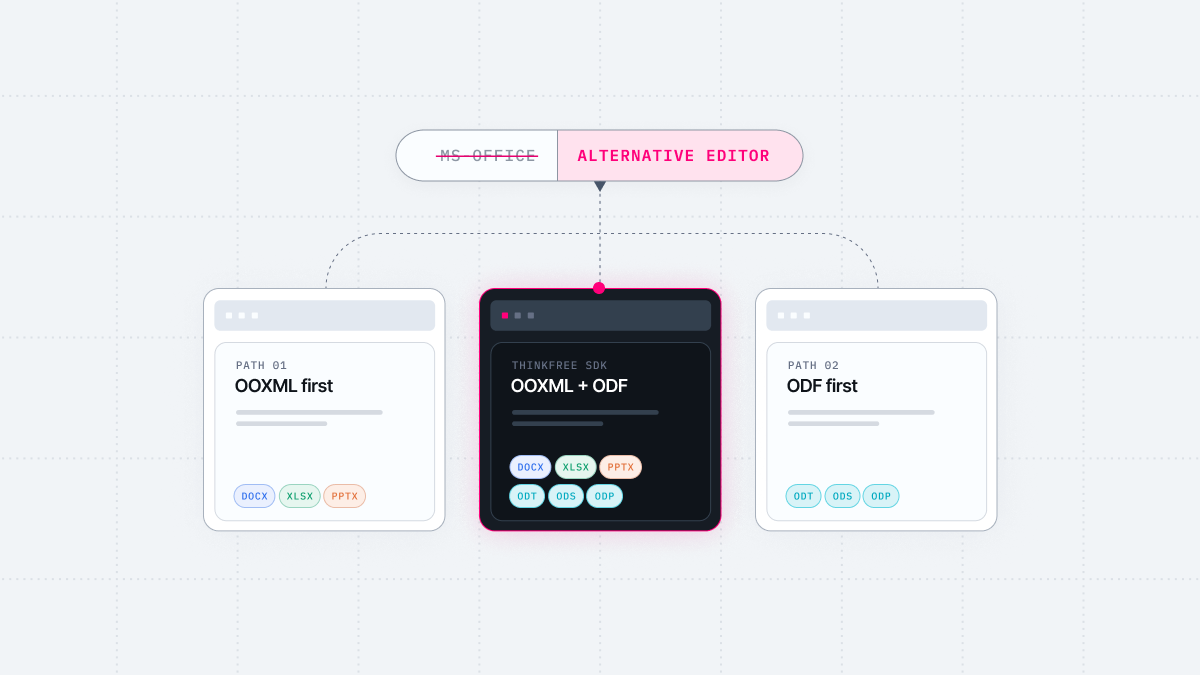
If most of your documents are in OOXML formats such as DOCX, XLSX, and PPTX and will stay that way, you can switch editors without changing formats. Options include ONLYOFFICE and Euro-Office, a fork of ONLYOFFICE built by European technology companies.
ONLYOFFICE uses OOXML as its native editing format. Other formats are converted to OOXML for editing and converted back on save. The ONLYOFFICE Help Center notes that some data and formatting may be lost during this process. If you also work with ODF, check that your documents retain their formatting after conversion.
Euro-Office inherited this conversion engine, and its release notes record fixes to the ODT-to-DOCX conversion process.
Euro-Office is a young project that released its first stable version in June 2026. When it forked from ONLYOFFICE that March, the two sides disagreed over how to interpret the AGPLv3 license.
Euro-Office raised concerns about geopolitical trust, stating that a substantial share of ONLYOFFICE’s development team was based in Russia. ONLYOFFICE countered that it is headquartered in Latvia and had sold its Russian business in 2019. ONLYOFFICE later suspended its partnership with Nextcloud, a member of the Euro-Office coalition.
If vendor jurisdiction is a procurement requirement, review both sides’ positions and verify the current corporate structure directly. Read more about the Euro-Office fork
Organizations committed to ODF that rely on relatively few existing OOXML documents can move quickly to an ODF-centered editor. Collabora Online, based on LibreOffice from The Document Foundation, is one option and natively supports ODF formats (.odt, .ods, .odp).
Collabora Online processes documents on the server with the LibreOffice engine and sends the rendered view to the browser. Along with ODF, it supports editing and saving Microsoft formats such as DOCX, XLSX, and PPTX.
However, Collabora notes that OOXML documents are not always fully compatible across Microsoft’s own products and that other developers also face difficulties achieving full compatibility. Its release notes also document ongoing work to improve formatting and compatibility when files are reopened in Microsoft Office. When you exchange documents with Microsoft Office, allow for some differences in implementation.
Even if ODF migration is the goal, many existing documents and files received from external parties may still be in OOXML during the transition. Before adoption, open, edit, and save real OOXML business documents in the candidate editor. Then reopen them in Microsoft Office and check the formatting.
If you want to keep using existing OOXML documents while gradually expanding your use of ODF, you need an editor that handles both formats directly. Thinkfree Document Editor SDK is an option for this dual-track strategy. It combines the Thinkfree Office editor with object-level APIs, drawing on more than 25 years of development since Thinkfree launched the world’s first web office in 2000.
Like the products above, it can connect to self-hosted storage such as Nextcloud. It can also connect directly to S3 or WebDAV storage without a separate document management system, or integrate with an existing one through WOPI.
The editor supports editing and saving both OOXML and ODF documents. By editing and saving ODF files without converting them to OOXML, the editor reduces the risk of conversion-related formatting loss. Saved files remain in your organization’s storage in their original formats, such as DOCX or ODT.
Its JavaScript APIs let applications and AI agents edit the document the users are viewing. Users can then review and revise the results in the same editor. This suits organizations building self-hosted workflows where people and AI agents work on documents together. AI requests go to the model provider your organization selects, so the choice of model should be part of your data sovereignty review.
Thinkfree is a commercial product developed and supported by a single vendor based in South Korea. Organizations that require open-source software may exclude it from their shortlist. On the other hand, organizations whose policies restrict licenses such as AGPL may find the licensing review simpler.
Thinkfree has a browser-based editor but no desktop app. Organizations that need offline editing should take this limitation into account.
Before adopting a Microsoft Office alternative, test it with your organization’s actual documents.
Check elements prone to compatibility issues separately, including tracked changes, comments, images, and numbered lists. If you also use ODF, test ODF files the same way.
Thinkfree has published the results of a round-trip test using this method. A sample DOCX containing a range of document structures was processed in Microsoft Word and Thinkfree, and the resulting files were compared.
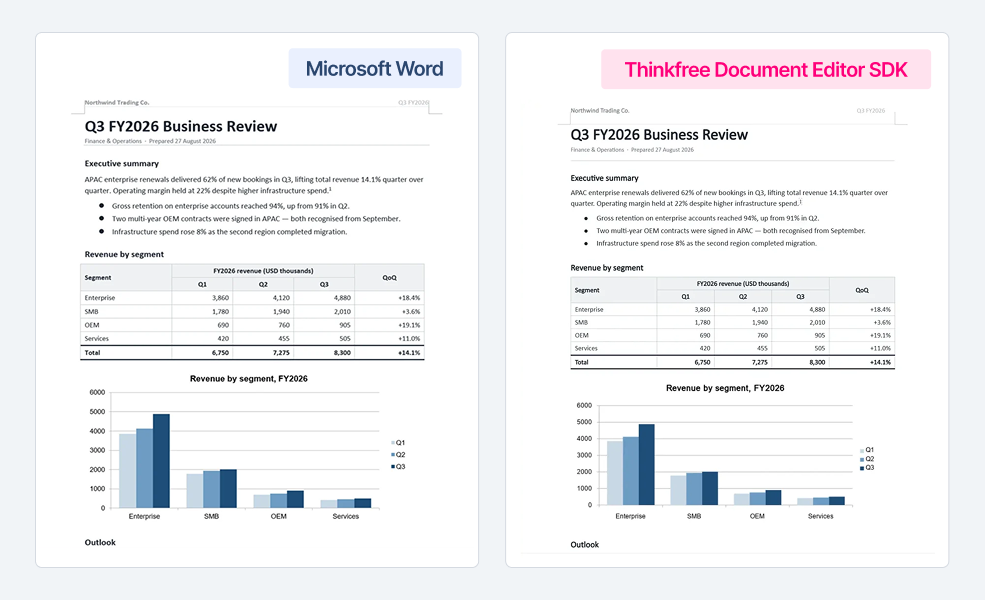
You can download the test DOCX and try it in other candidate products. See the full results
See how Thinkfree compares feature by feature.
Run Document Editor SDK in your own environment.
Evaluate the SDK free for 30 days.
Use it commercially at no cost for 180 days.
There is no single answer that fits every organization. Check data location, vendor jurisdiction, and licensing, then choose an editor based on your document format strategy.
An OOXML-focused editor makes sense if most of your documents use OOXML. An editor with strong ODF support is a better fit if your organization has a clear ODF migration policy. If you need both formats, consider an editor that handles OOXML and ODF directly. Explore Thinkfree Document Editor SDK
It depends on the product and the document. OOXML is a broad and complex format, and Collabora explains that developers other than Microsoft also face difficulties achieving full compatibility. The most reliable approach is to test how your actual business documents behave when opened and saved. In Thinkfree’s round-trip test, all 19 OOXML parts in the sample DOCX were retained.
ODF can support long-term data sovereignty. As an international standard (ISO/IEC 26300) independent of any specific vendor, it can help with long-term preservation and portability. For organizations that rely on existing OOXML documents, the challenge is adopting ODF without disrupting established workflows.
With a dual-track strategy, organizations can gradually expand their use of ODF, starting with new or archival documents, while continuing to use existing OOXML files. Learn more about the ODF and DOCX dual-track strategy
Yes. Thinkfree Document Editor SDK lets you embed Word, Spreadsheet, and Presentation editors in your web application and deploy them in a self-hosted environment on your customers’ infrastructure. You can try the SDK in the Playground without signing up. Try the Playground
Not necessarily. The editors covered in this article can integrate with self-hosted storage such as Nextcloud. Thinkfree can also connect directly to S3 or WebDAV storage without a separate document management system. If your document management system is integrated with OOS, you can use WOPI integration to assess whether switching is possible with your current version and configuration.
Before adopting a new editor, check how each option connects to your existing storage.
Like this post? Share with others!