
AI is being used with documents in many ways. AI capabilities can be added to office suites, documents can be generated and edited within AI services, and agents can call document tools. Each of these operates within its own environment.
However, developers may need more than a ready-made AI document feature. They may need to embed a document editor in their own application, control the document with code, and connect their preferred LLM or an existing agent.
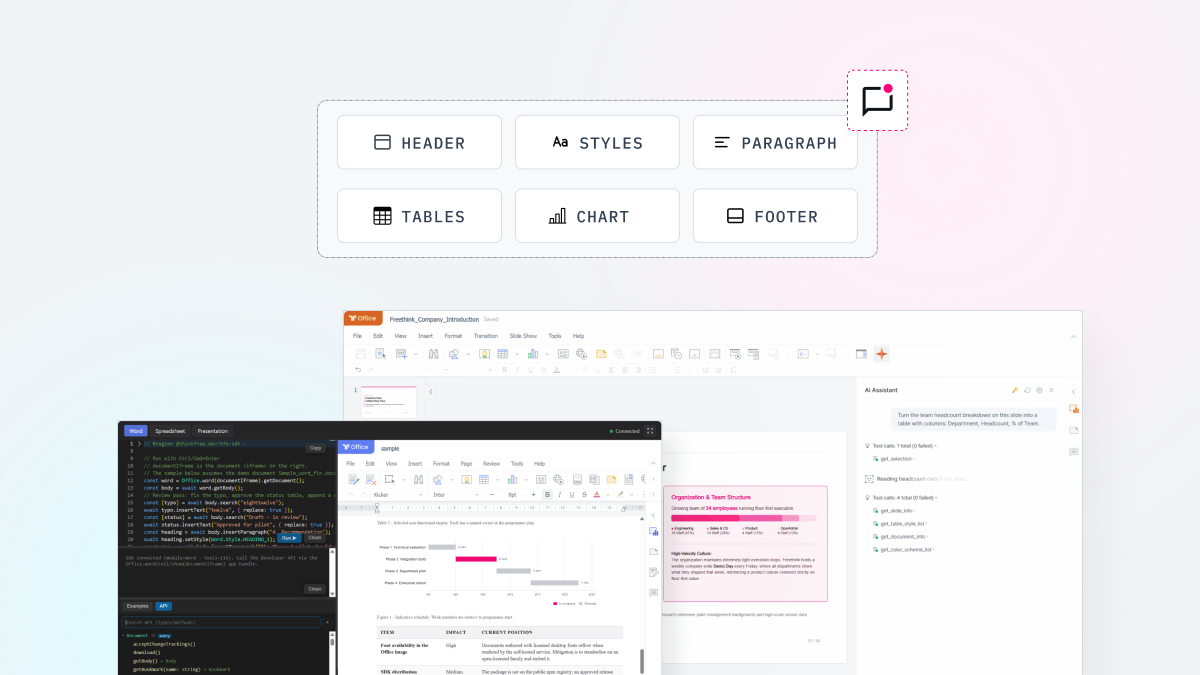
Document Editor SDK is built for these needs. Based on the Thinkfree Office editor and engine, it separates document editing and AI integration into modular SDKs. You can embed the editor in your application, control the open document with code, and connect your preferred LLM or an existing agent. You can choose the capabilities you need and combine them with your existing application.
Building document editing capability from scratch requires much engineering effort. One major reason is the complexity of the OOXML format specification. If formatting such as tables, layout, or charts breaks, the result falls short of what a business needs.
Using AI to work with documents raises another challenge. The LLM’s output needs to be reflected in the document’s structure and formatting. If the model cannot identify which elements to edit, it may understand the content without being able to edit the document correctly.
Document Editor SDK connects this process through the editor and a set of document tools. Embedding the editor in your application lets you open and edit documents while preserving their structure and formatting. Instead of working with the document file directly, the LLM calls document tools provided by Editor SDK, which applies the requested action to the document currently open in the editor.
When a user asks an application to edit a document with AI, Document Editor SDK can handle the request in the following steps.
You don’t need all of these steps in every application.
You can choose the capabilities you need based on the document features you want to build and your AI integration needs.
Component | What it does |
|---|---|
Editor SDK | Controls the embedded Thinkfree Office engine and editor with JavaScript (a single SDK supporting Word, Spreadsheet, and Presentation) |
Editor AI SDK | Registers Editor SDK's document tools with your agent and executes the selected tool on the document currently open in the editor. |
Editor SDK turns the existing Thinkfree Office engine and editor into an SDK. It includes modules that handle major formats such as OOXML and ODF for Word, Spreadsheet, and Presentation documents. You embed the editor with a document open URL, then connect to it with code and wire up the actions needed for users to open, edit, and save documents.
Editor AI SDK registers Editor SDK’s document tools with your AI agent so it can operate on the document currently open in the editor. The LLM selects a document tool, and the application executes it to apply the requested change.
In production, your application can route model requests through a relay server that keeps the provider credential on the backend. The browser hosts the editor and executes approved document tools, allowing users to review AI changes and continue editing in the same editor. You can integrate your preferred LLM without moving users to a separate document application or add-in.
Self-hosted Office | Cloud Office (Planned for H2 2026) | |
|---|---|---|
Who operates it | Customer | Thinkfree |
Runtime environment | Own infrastructure | Environment managed by Thinkfree |
Integration method | Direct container deployment (Docker) | API session issuance |
Document source | Own storage connection | Single file upload, or Amazon S3 and S3-compatible storage |
Choose Self-hosted if you want to run the service on your own infrastructure and manage your documents and features directly. If you prefer not to operate it yourself, our Cloud Office option is planned for release in the second half of 2026, letting you use the API in a Thinkfree-managed environment.
Document Editor SDK fits AI products that work with specialized documents in fields such as legal, finance, HR, or consulting. AI-generated or analyzed results can be applied to documents within the service, allowing users to review and edit the results in the same editor.
If you already run your own agent, you can connect it to Editor SDK’s document tools so it can edit documents directly.
Enterprise applications such as groupware can add document viewing and editing capabilities directly to their own services. Users can revise a draft, open and edit an attached document, or fill out and save a document in a fixed template, all without leaving the app.
This is for teams that build and deliver document functionality in a client’s environment. You can add AI document editing to your portfolio without developing it in-house. Deploy Self-hosted within the client’s infrastructure, or integrate Cloud Office without running your own servers.
The following example shows how to connect the SDK to a document already open in the iframe and read its content.
					import { Office } from "@thinkfree.dev/tfo-sdk";

// The iframe already has a document open
const iframe = document.querySelector("#office-frame");
const word = Office.word(iframe);

await word.whenReady();
const doc = word.getDocument();
const body = await doc.getBody();
console.log(await body.getText());
You can also register Editor SDK’s document tools with an agent you already run. If your agent exposes registerTool and unregisterTool, Editor AI SDK’s bridgeToolsViaSdk() registers the tools available in the current editor with it. Each tool consists of name, description, inputSchema, and execute(args). Editor AI SDK ships as a separate package and requires Editor SDK.
					import { bridgeToolsViaSdk } from "@thinkfree.dev/tfo-ai-sdk";

const agentTools = new Map();
const toolBridge = await bridgeToolsViaSdk(word, {
  registerTool(tool) {
    if (tool.name === "insert_text") agentTools.set(tool.name, tool);
  },
  unregisterTool(name) { agentTools.delete(name); },
});
Your application connects the LLM and implements the tool-calling flow you need. When it executes a registered tool, Editor SDK applies the change to the current document. Registered tools can also be unregistered when the editor session ends.
Business documents require more than creation and editing. They also need to be stored, managed, and tracked throughout their lifecycle. Document Editor SDK handles the first stage, with Document Management SDK and Document Governance SDK planned for the next stages.
Instead of adding document functionality to your own product roadmap, you can see how the SDK integrates and works directly in code at Thinkfree Developers.
Like this post? Share with others!