

As generative AI advances rapidly, many SaaS vendors, solution providers, and ISVs are adding AI-powered document generation to their existing products. Anthropic’s Claude API is widely considered for producing business documents such as proposals, reports, and presentations because of its natural language understanding and long-context processing capabilities.
In a PoC, implementing document generation with Claude is usually not difficult. If a SaaS product wants to add a feature to create PPT or Word files, it can simply call the Claude API and return the generated file through a simple integration layer. But the moment you try to deploy that implementation to production, issues that were invisible during the PoC start to appear.
Users expect far more than content generation. They assume they can edit existing documents, change templates, roll back to a previous version, collaborate with multiple users, and manage documents according to corporate policy. In other words, users treat having a document generated and using documents as editable assets as the same thing.
Take a generated proposal as an example. A common request from users is “Please update just this one slide.” Users expect an editing experience in which the existing document state remains intact and only the necessary parts are modified naturally. That is not the same as having the AI regenerate a PPTX file from scratch.
This difference may not be obvious in personal productivity tools. However, turning it into a production-ready feature for hundreds of enterprise customers introduces entirely different challenges regarding cost, latency, governance, and maintenance. These challenges become much more apparent in targeted B2B SaaS products, report-generation platforms, ERP systems, and other enterprise applications. That is why we need to reframe the question from “Does Claude API create PowerPoint slides well?” to a different perspective.
The Claude API itself does not offer state management or editing of PowerPoint documents. Generally, the API generates outputs based on the given prompt, and maintaining persistent document state is the responsibility of the application layer.
In practice, PowerPoint editing with Claude generally follows one of the following approaches.
One common approach to implementing PPT editing with Claude is to unpack the file, modify the OOXML, or use a PPT generation library. In such cases, even a request to change a single slide often results in processing that effectively reconstructs the entire document package. This differs completely from an editor that manages internal state to modify specific parts. Although it may appear as a partial edit on the surface, the underlying processing structure is closer to full regeneration.
Many Claude API implementations generate a new PPTX document for each request rather than modifying an existing document with persistent state. This approach works well for prototypes and demos. However, running it reliably in production requires infrastructure for caching, queuing, retries, and failure recovery.
• Generation-first: Prompt → Regenerate PPTX → Verify
• State-based: Prompt → Editor State → Live Update
A Claude API document generation system can be implemented using Code Execution, external libraries, and custom processing logic. This architecture often requires dedicated post-processing and QA pipelines like PDF conversion or image rendering to validate layout integrity. The system must verify that formatting and layout are preserved without breaking the original structure. It is not just about checking if the intended content is present.
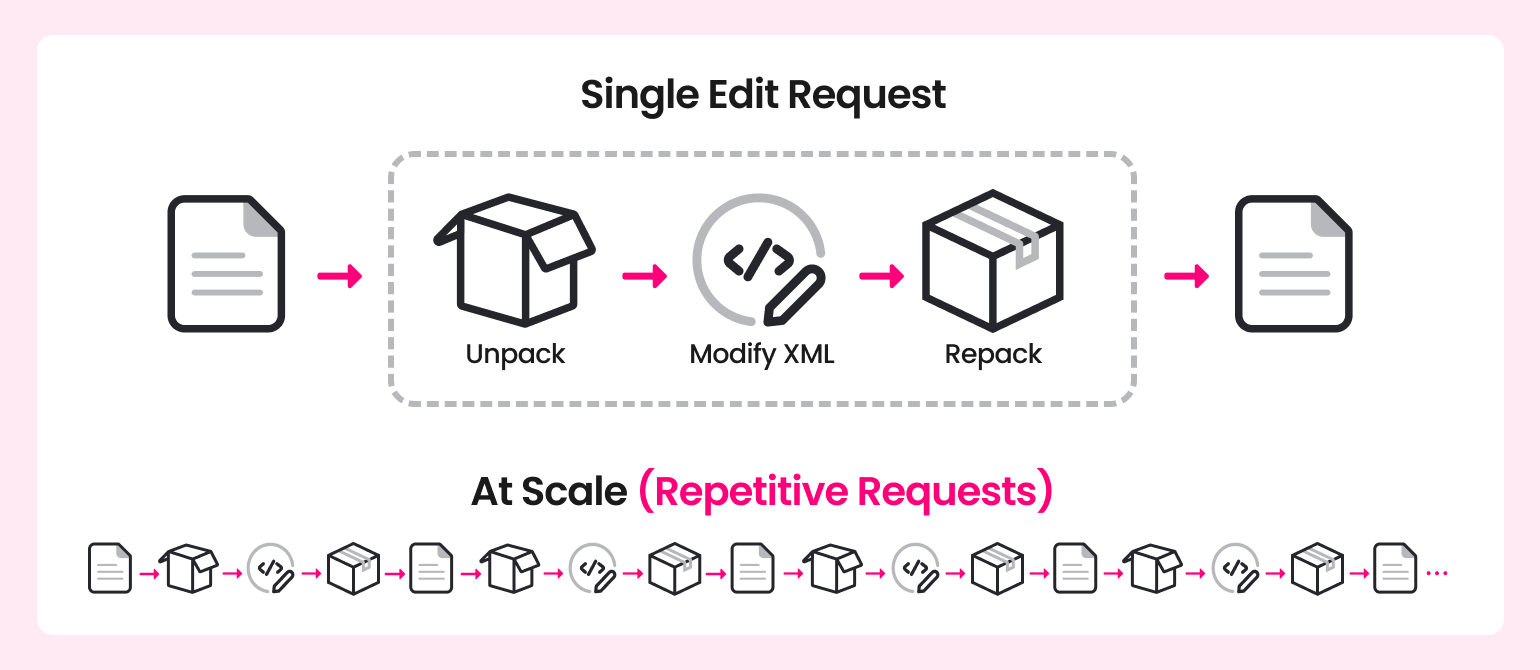
Document editing typically follows an unpack → modify → repack process. The process of serializing the document package back into a ZIP archive involves modifying and organizing the slide XML before repacking. As a result, repeated reconstruction of the document package becomes difficult to avoid.
This characteristic is not a major issue in environments with few users. But engineering overhead increases as the client base and request volumes increase because the amount of processing required for each request also grows. Processing costs directly affect service efficiency and operating costs in services with many repeated requests like automated proposal SaaS or report platforms. Application developers must also design caching strategies, queue management, retry policies, and failure recovery logic also grows. In short, sometimes the supporting infrastructure required to reliably process documents is a larger engineering challenge than the document generation function itself.
Implementations that use Anthropic’s Skills, code execution environments, or similar setups often include conversion or rendering steps for verification. The issue is that generative AI does not guarantee consistent results across repeated executions. It is difficult to guarantee that this conversion process perfectly matches the rendering results of office document tools like PowerPoint.
This variability becomes difficult to control in user experience. documents for business require consistent layouts, retained styles, and adherence to template rules. This is manageable for one-off tasks or manual review processes. However, operating this as a service feature requires consistently delivering predictable results without human intervention. The real challenge lies in how predictably the entire service pipeline behaves and how well it can control results, rather than in simple automation alone.
Claude API document generation is typically implemented to create outputs based on stateless requests. Enterprise-grade document functionality requires persistent document state, managing edit histories, saving versions, and controlling permissions. Therefore, you must build dedicated infrastructure to manage persistent state maintenance, history tracking, and version control.
This difference presents another layer of engineering complexity when scaling beyond individual users. It requires comprehensive consideration of verification, failure handling, log collection, and audit trails. Access control, audits, storage locations, and model choices are often mandatory requirements in regulated industries such as Vertical SaaS. The burden of building these core requirements internally falls entirely on the application provider.
Users can use AI features without sacrificing the familiar editing experience. The application maintains the editing context throughout the workflow. In this sense, the flow in which AI changes document state inside the editor rather than generating output outside it is an important dividing line between a generation-first approach and a state-based editing architecture.
Thinkfree Document Editor SDK is an AI Document Engine that lets you embed OOXML and ODF editors into your application. At its core, it is an AI-native document editing engine. Rather than generating documents from scratch, the SDK maintains editable documents with persistent state.
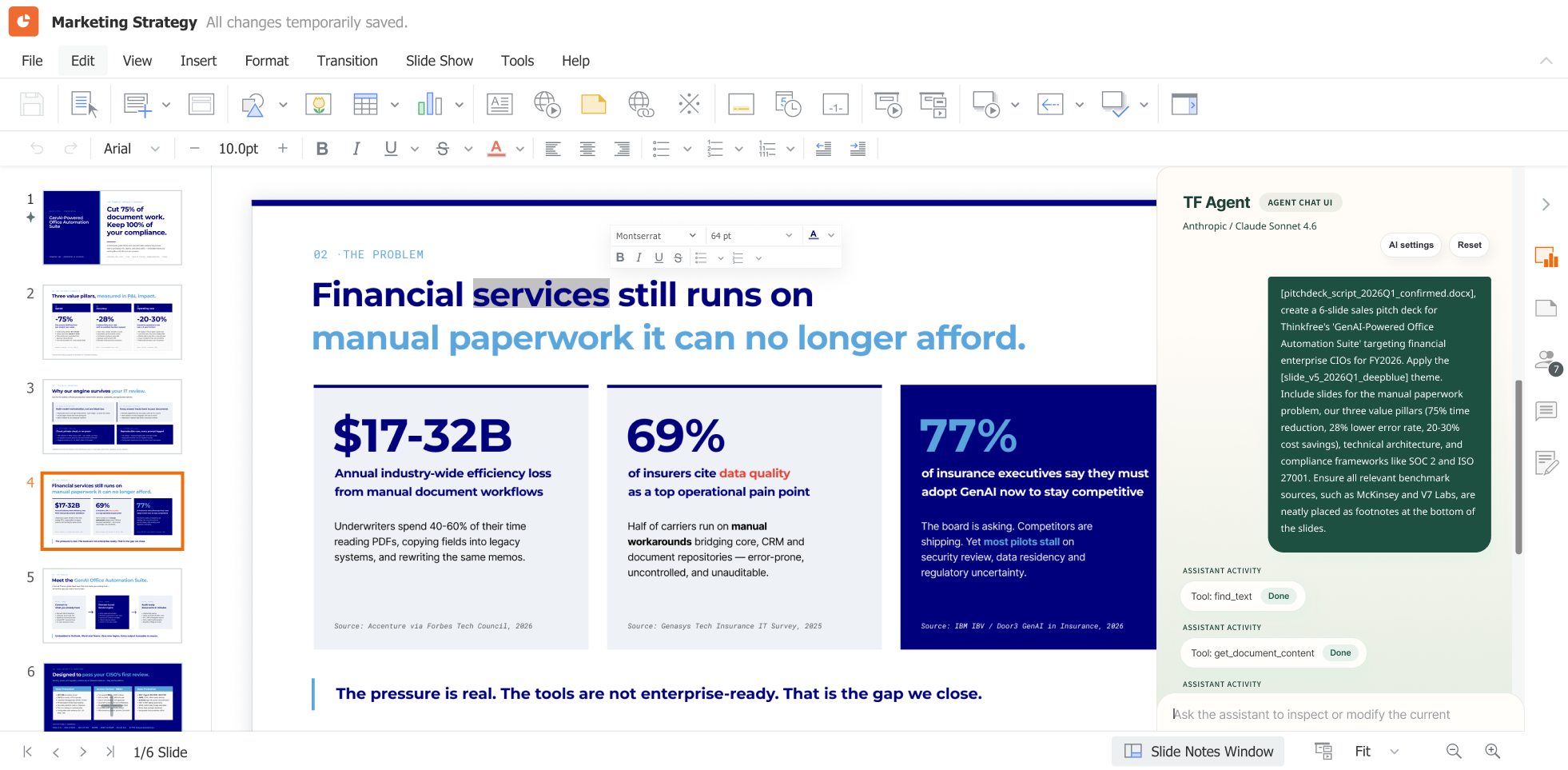
Users can use AI features without sacrificing the familiar editing experience. The application maintains the editing context throughout the workflow. In this sense, the flow in which AI changes document state inside the editor rather than generating output outside it is an important dividing line between a generation-first approach and a state-based editing architecture.
Thinkfree Document Editor SDK Process:
User Command (AI Chat Prompt) → Editor State Updated → Live Document Update → Undo & History Preserved
For B2B software vendors, a production-ready document platform matters more than standalone AI capabilities.
Those requirements cannot be solved by simple AI calls alone. The competitiveness of the service depends on maintaining quality, recovering reliably from failures, and meeting client security requirements when operating a proposal SaaS. The same applies when adding presentation features to ERP systems or groupware.
Users expect more than AI-generated slides. They expect to work naturally with existing documents, track changes, and work together with multiple users. In the end, enterprises should aim not for AI features alone, but for an enterprise document platform.
In Thinkfree Document Editor SDK, the document editor maintains the current document. User actions and natural-language commands are reflected in the editor. All edits are handled within the editor’s native state management layer. In other words, you can apply only incremental changes while preserving the editing session.
Instead of regenerating the entire document for every change, the SDK applies only incremental updates. It makes system throughput more predictable in production. It also makes it easier to design systems that scale efficiently.
Verifying results is one of the hardest problems when applying document generation features to services. All tasks in the Thinkfree Document Editor SDK are rendered immediately in a WYSIWYG editor running in the browser. What the user sees on the screen is the final output without additional rendering or conversion processes.
As a result, a separate rendering validation pipeline is no longer necessary. It also delivers a more predictable user experience by reflecting edits exactly as seen.
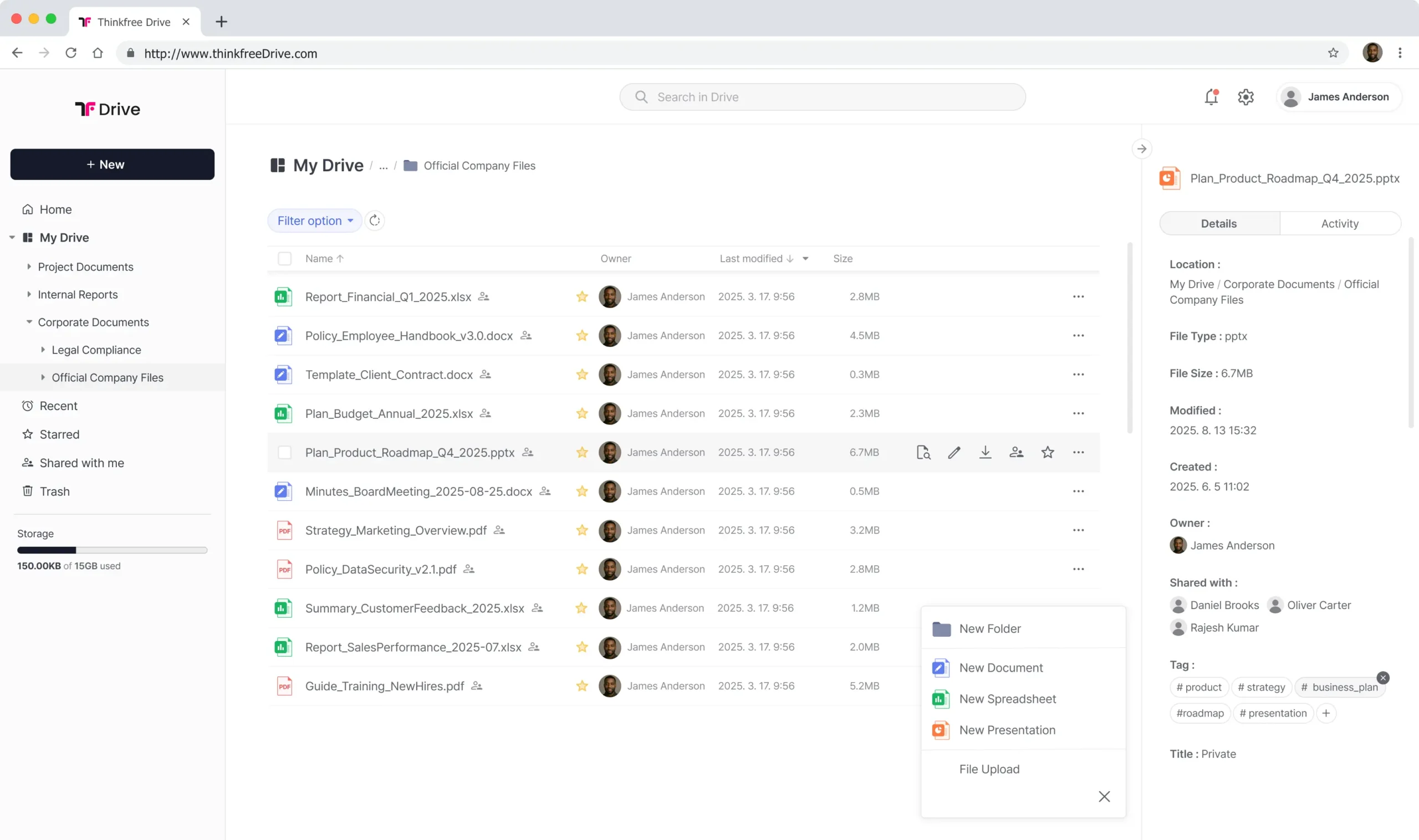
Access control, storage locations, and audit trails are often key evaluation criteria in regulated industries. Thinkfree Document Editor SDK is designed to integrate with existing applications while taking these requirements into account. It supports deployment options such as on-premises environments and private cloud, and it provides the underlying infrastructure for managing document state and change history.
As a result, document editing becomes a native part of the application. You can also configure Thinkfree Document Management SDK to expand version control and history management in collaborative storage environments.
The approach is especially useful for solution providers that need to design document functionality in line with each enterprise’s security and operating policies.
By adopting a proven document engine instead of building your own editing capabilities, you can expect several advantages not only in operations but also in long-term product strategy.
Successful production deployment, maintainability, and flexible client response are far more important than flashy demos in the B2B market. Companies can save engineering resources spent on document features by adopting a verified SDK. Teams can instead focus on developing core differentiators.
Category | Direct implementation with Claude API | Thinkfree Document Editor SDK |
|---|---|---|
State management | Requires separate implementation | Built-in |
Change tracking & Undo/Redo | Requires separate implementation | Built-in |
Rendering | Requires separate rendering verification | |
Compatibility (OOXML/ODF) | Requires external libraries | Native engine embedded |
Collaboration features | Requires separate implementation | Built-in |
Permission & Version Control | Requires separate implementation | Configurable |
AI Model | Claude-centric | Vendor-agnostic (Bring-your-own LLM/sLLM) |
Thinkfree Document Editor SDK can be fully integrated into an existing application in a white-label format, maintaining brand consistency, while keeping the operational impact of failures contained within your own integration layer. At the same time, adopting this approach can reduce development time and maintenance costs over the long term.
Architecture decisions are fundamentally different depending on whether document AI is treated as a personal productivity tool or an enterprise product capability. Building enterprise-grade document features requires persistent document state, predictable rendering, governance, and collaboration. Those requirements go beyond what AI generation alone is designed to provide.
Are you evaluating document features built with generative AI such as Claude API? Thinkfree Document Editor SDK is an AI Document Engine designed to integrate AI-based document generation and editing into existing SaaS, groupware, ERP, data platforms, and industry-specific solutions. If you want to understand the integration approach that best fits your service architecture and deployment environment, speak with our team.
See how it works in your product.
Curious how it fits your stack?
Yes. Thinkfree Document Editor SDK connects your preferred LLM with a full-featured presentation editor, enabling AI-generated content to become a fully editable PowerPoint presentation. Users can review, modify, and refine slides immediately within the same workflow.
No. Claude and other LLMs generate content, while Thinkfree Document Editor SDK provides the document engine that turns AI-generated content into editable Office documents and presentations. Together, they enable end-to-end AI document workflows.
Yes. Thinkfree Document Editor SDK is designed to work alongside Claude and other large language models. Its vendor-agnostic architecture allows developers to integrate their preferred LLM while adding enterprise-grade PowerPoint creation, editing, and document automation capabilities to their applications.
Yes. Thinkfree Document Editor SDK uses a model-agnostic architecture, allowing organizations to integrate Claude, OpenAI models, open-source LLMs, or private small language models (sLLMs) based on their business and deployment requirements.
Like this post? Share with others!